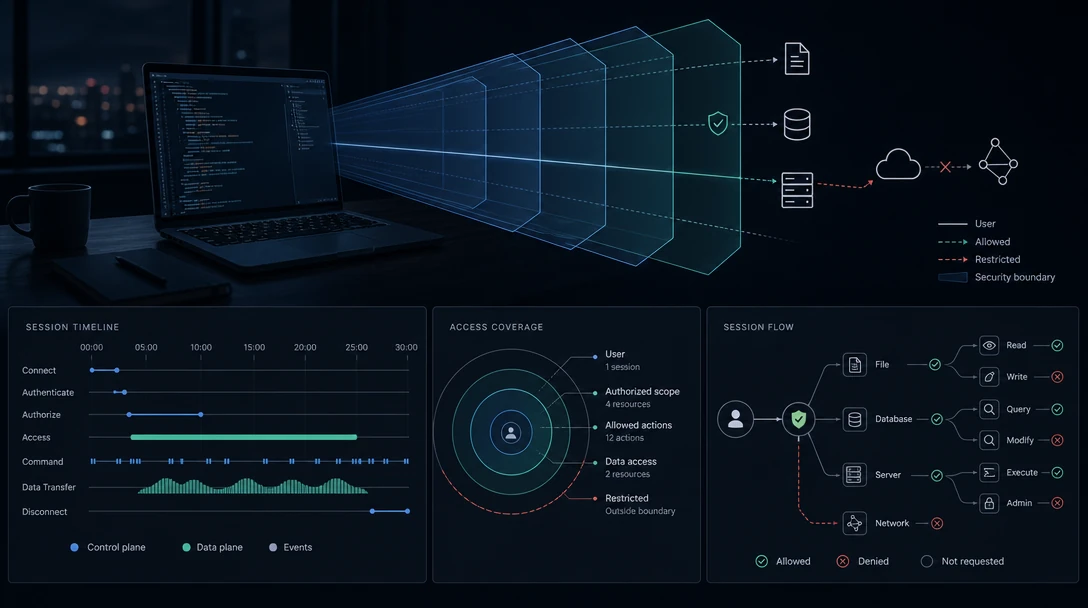
TL;DR: With the sandbox off, Claude Code's reach is your user account's reach, narrowed by permission prompts. With the sandbox on, writes are confined to your working directory but reads still cover the entire machine, including
~/.sshand~/.aws/credentials, until you list exclusions yourself. Network access is the strictest default: no domains are pre-allowed.
"What can it actually see?" is the first question most developers ask before running a coding agent on a work laptop, and it is usually answered with a shrug about permissions. It has a specific answer. This page gives it, verified against Anthropic's documentation in September 2026, with the settings that change each boundary.
One framing note before the details. Claude Code's reach is not a single number. It depends on whether the Bash sandbox is enabled, which permission mode the session is in, and which tool is making the request. Those three interact, and most confusion comes from collapsing them into one.
Table of Contents
- What Is Claude Code Security?
- Filesystem Reach: Reads and Writes Are Not Symmetrical
- Credential Reach: What Sits Inside the Read Boundary
- Network Reach: The Strictest Default
- Configuration Reach: What It Cannot Touch
- Where the Sandbox Stops Applying
- A Hardening Sequence for One Laptop
- What This Does Not Answer
- Frequently Asked Questions
What Is Claude Code Security?
Claude Code security is the combination of permission modes, ordered allow/ask/deny rules, an OS-enforced Bash sandbox, lifecycle hooks, and managed settings that together decide what a session may read, write, execute, and connect to. On a single laptop the practical question it answers is narrower: how far past your project directory does a session reach, and under what conditions.
Two mechanisms do most of the work, and they have different scopes:
- Permission modes decide whether Claude asks before an action.
- The Bash sandbox decides what an action can reach once it runs.
A session in Manual mode with no sandbox still asks before most things. A session in auto mode with a sandbox does not ask much but is confined. Neither combination is strictly safer than the other; they fail differently.
Filesystem Reach: Reads and Writes Are Not Symmetrical
This is the single most misread part of the model. With the Bash sandbox enabled:
| Direction | Default reach |
|---|---|
| Write | The working directory and its subdirectories, directories added with --add-dir or permissions.additionalDirectories, and the session temp directory |
| Read | The entire computer, except directories you explicitly deny |
Anthropic's documentation states the consequence directly: the default read behavior "still allows reading credential files such as ~/.aws/credentials and ~/.ssh/."
So the mental model of "the sandbox keeps it in my project folder" is half right. It keeps writes in your project folder. Reads are open by default, and reads are what matter for exfiltration.
That asymmetry is where runtime control infrastructure like Gensee Crate becomes relevant: a write boundary is checkable at the moment of the write, while a read only becomes interesting later, once you can see where the data went.
Separately from the sandbox, Manual mode adds a working-directory boundary for the agent's own tools: Claude Code can only write to the folder it was started in and its subfolders, and asks before reading paths outside that boundary with the Read, Grep and Glob tools. Note the asymmetry again: that prompt is a prompt, not a block, and it applies to those tools rather than to read-only Bash commands. To restrict the broader read access available to read-only Bash commands, you need sandbox denyRead rules, which apply only when sandboxing is enabled.
Two settings tighten the read side:
sandbox.credentialswith"mode": "deny"for specific files and environment variablespermissions.blockReadsOutsideWorkingDirectories(v2.1.257+), which makes reads outside the working directories require approval even in auto mode andbypassPermissions
Credential Reach: What Sits Inside the Read Boundary
Because the read boundary is the whole machine, everything a developer's account can read is in scope until excluded. On a typical work laptop that is a long list: ~/.ssh, ~/.aws/credentials, ~/.kube/config, .env files across every checked-out repository, ~/.netrc, ~/.docker/config.json, browser profile directories, and the environment variables your shell exports into every subprocess.
The documentation is unambiguous about the default: there is no built-in credential deny list, so only the files and variables you list are restricted. Claude Code protects its own credential store, ~/.claude/.credentials.json, and stores API keys in the macOS Keychain where available. Your other credentials are your responsibility to name.
The minimum useful configuration:
{
  "sandbox": {
    "enabled": true,
    "failIfUnavailable": true,
    "credentials": {
      "files": [
        { "path": "~/.ssh", "mode": "deny" },
        { "path": "~/.aws/credentials", "mode": "deny" },
        { "path": "~/.kube", "mode": "deny" }
      ],
      "envVars": [
        { "name": "GITHUB_TOKEN", "mode": "deny" },
        { "name": "NPM_TOKEN", "mode": "deny" }
      ]
    }
  }
}
deny entries merge across every settings scope and no scope can remove one another scope added, so an organization can distribute this safely. For subprocesses regardless of sandboxing, CLAUDE_CODE_SUBPROCESS_ENV_SCRUB strips credentials more broadly.
Why the list matters more than the setting: an agent rarely reaches a credential because it was told to. Gensee's AP-004 credential harvesting pattern describes the ordinary route, where debugging, deployment and CI tasks lead an agent toward secrets and authenticated CLI state through steps that each look reasonable. The defense is deciding in advance which paths are never in scope, because judging it step by step is exactly what fails.
Network Reach: The Strictest Default
Network is where Claude Code's defaults are tightest, and it is worth knowing because it is the one place the answer is genuinely reassuring.
- Claude Code pre-allows no domains by default. The first time a sandboxed command needs a host, it prompts.
- Choosing "Yes" allows that host for the session. Choosing "Yes, and don't ask again" writes a
WebFetch(domain:...)allow rule to your local settings, which persists into future sessions. strictAllowlist(v2.1.219+) denies instead of prompting. Set in user, managed or CLI settings only; a repository's.claude/settings.jsoncannot enable it.allowManagedDomainsOnlyin managed settings honors only the organization's entries.- Restrictions apply to all scripts, programs and subprocesses spawned by sandboxed commands.
The caveat worth stating for anyone whose threat model includes exfiltration over an allowed host: the built-in proxy enforces the allowlist based on the requested hostname and, by default, does not terminate or inspect TLS traffic. An approved domain is approved for whatever travels to it. The experimental network.tlsTerminate setting (v2.1.199+) changes this.
That second-session persistence is the detail to sit with. A domain approved once during a late-night debugging session stays approved, in a settings file, indefinitely. Gensee Crate operates at the layer where that matters, correlating what an approved channel actually carried rather than whether the approval existed.
Configuration Reach: What It Cannot Touch
Inside the directories sandboxed commands can write to, the sandbox still denies writes to the files Claude Code loads its own configuration and code from. The reasoning is that a command able to edit those files could grant itself permissions or register a hook that runs outside the sandbox.
The protected set covers four groups:
- In your working directory and directories above it:
.claudesettings files, the.claude/skills,agents,commandsandhooksdirectories,.mcp.json, and files Claude Code runs on its own such as.claude/workflows - In your working directory only: shell startup files such as
.bashrcand.zshrc,.gitconfig, the.vscodeand.ideadirectories, andhooksandconfiginside.git - Files that would turn your working directory into a bare git repository
- Most of
~/.claude, plus~/.claude.jsonand the.credentials.jsoncredential store
There is no way to exempt one of these paths. An allowWrite entry or an Edit allow rule does not lift the protection; only disabling filesystem isolation entirely does. Run /sandbox and open the Config tab to see the resolved list for your machine.
MCP Servers: Reach You Add Yourself
Everything so far describes the tools Claude Code ships with. Model Context Protocol servers add tools, and with them, reach that no sandbox setting anticipated.
Anthropic's position is stated plainly in the security documentation: the list of allowed MCP servers is configured in your source code as part of settings engineers check into source control, and while Anthropic reviews connectors against listing criteria before adding them to its directory, it "does not security-audit or manage any MCP server."
For a laptop assessment, three consequences follow:
- An MCP server is a separate process with its own permissions. The Bash sandbox governs the Bash tool. A tool exposed by an MCP server runs wherever that server runs, under whatever account started it.
.mcp.jsonis protected from modification, not from content. The sandbox denies writes to.mcp.json, which stops an agent from registering a new server mid-session. It says nothing about what the servers already listed there can do.- Trust verification is the gate, and it has an off switch. New MCP servers require trust verification, which is disabled when running non-interactively with
-p.
The practical rule is that your laptop's exposure is the union of Claude Code's reach and every MCP server's reach, and only the first half is described by the settings above.
Where the Sandbox Stops Applying
Four conditions put a command outside the boundary described above. Each is documented and intentional; together they are the honest answer to "how confined is it really."
- The sandbox is not running. It is built in on macOS via Seatbelt, and on Linux and WSL2 via bubblewrap, which needs two packages installed. Native Windows is not supported, so you run Claude Code inside WSL2. If the sandbox cannot start, Claude Code shows a warning and runs commands unsandboxed.
sandbox.failIfUnavailable: truemakes that a hard failure instead. - The command cannot be sandboxed. Commands needing full system access fall back to the regular permission flow, with the prompt titled "Bash command (unsandboxed)" so a human can tell.
- The tool is not Bash. The sandbox governs the Bash tool. Other tools follow permission modes and rules.
- Trust verification is off. First-time codebases and new MCP servers require trust verification, but this is disabled when running non-interactively with
-p. Starting Claude Code directly in your home directory also holds trust for the session only, never writing it to disk.
A Hardening Sequence for One Laptop
For a developer machine, in the order that closes the widest gaps first:
- Enable the sandbox and set
sandbox.failIfUnavailable: true. Without the second, an unsupported platform silently means no sandbox. - List credential files and environment variables under
sandbox.credentials. Nothing is denied until you name it. - Set
permissions.denyrules for anything categorically off limits. Deny rules hold in every mode, includingbypassPermissions. - Decide the network posture: prompting is the default and is reasonable;
strictAllowlistif you want denial instead. - Choose a default mode per repository. Manual for anything sensitive,
acceptEditsfor routine work. - Audit periodically with
/permissionsand/sandbox. The "Yes, and don't ask again" answers accumulate in local settings and nothing prunes them. - Never run
bypassPermissionsoutside a container. Claude Code refuses it as root or undersudo, and the dev container configuration runs as a non-root user for this reason.
What This Does Not Answer
Everything above describes reach within a session. It says what a session may touch, given a policy written before it started.
It does not say whether a file this session is reading was written by a previous one, whether a domain approved last week is the same one now receiving repository contents, or whether an action that looks routine completes a sequence begun days ago. Gensee's research on multi-session agent safety documents how context drift and session-boundary confusion accumulate across that seam, and the AP-001 multi-step data exfiltration pattern shows how individually legitimate actions compose into a workflow-level effect no single approval would have caught.
Narrowing what a laptop exposes is worth doing, and it is the first thing to do. It is a different question from knowing what happened across the sessions that followed.
Frequently Asked Questions
Can Claude Code read files outside my project folder?
Yes. With the sandbox enabled, reads default to the entire computer except directories you deny; writes are confined to your working directory. In Manual mode, reads outside the working directory through the Read, Grep and Glob tools prompt first, but read-only Bash commands are governed by sandbox denyRead rules instead.
Can Claude Code read my SSH keys or AWS credentials?
By default, yes. Anthropic's documentation notes explicitly that the sandbox's default read behavior still allows reading ~/.aws/credentials and ~/.ssh/. There is no built-in credential deny list; add the paths under sandbox.credentials or filesystem.denyRead.
Can Claude Code connect to any website?
No. Claude Code pre-allows no domains by default, and the first time a sandboxed command needs a host it prompts. Answering "Yes, and don't ask again" saves a persistent allow rule to your local settings, so allowlists grow over time unless you audit them.
Does Claude Code work on Windows?
Claude Code runs on Windows, but the Bash sandbox does not support native Windows; Anthropic's guidance is to run inside a WSL2 distribution. Without WSL2 the sandbox is unavailable, and unless sandbox.failIfUnavailable is set, commands run unsandboxed with a warning.
What is the single most important setting to change?
sandbox.failIfUnavailable: true, paired with an explicit sandbox.credentials list. The first prevents a silent downgrade to no sandbox; the second closes the read boundary that is open by default. Neither is on out of the box.
Conclusion
The honest summary is that Claude Code's write and network boundaries are tight by default and its read boundary is not. That is a defensible design choice, since an agent that cannot read broadly is not much use, but it means credential protection is something you configure rather than something you receive.
Once a laptop is narrowed, the remaining questions are about what happened rather than what was permitted. Gensee Crate records effects independently of the agent that caused them, across sessions rather than within one. To discuss a deployment, book a demo, or read the underlying research on the Gensee blog.