Gensee Crate Enterprise / AI agent security

Secure AI agents.Keep business moving.

Give your teams the freedom to use AI agents, with policies that protect business data and controls that keep risky actions in check.

One place to protect AI work

Secure AI work across your business.

Set policies, see agent activity, and investigate risks across employee devices, business applications, and cloud workspaces.

Employee devices
Protect sensitive files and agent activity on employee laptops and developer machines, while keeping approved work moving.
Business applications
Keep agents within approved data and action limits in the applications your teams rely on.
Cloud workspaces
Give agents isolated spaces to explore new approaches, then review useful results before bringing them back.
One task. Connected protection.

The task changes shape.
Its boundaries shouldn’t.

An agent may read a document, write code, and update an application to finish one request. Keep the work connected to the same approved task and company policies.

YOUR BUSINESS POLICIES

Your task. Your boundaries.

Approved data, tools, recipients, and actions.

  1. 01Read & understand

    Use approved information

  2. 02Create & analyze

    Draft, calculate, and write code

  3. 03Use tools & apps

    Stay within the task’s limits

  4. 04Review & act

    Check consequential changes

One task. Consistent policies.A clear record for security teams.

An agent’s change of approach should not become a change of permission.

Product demo

See Gensee in action.

Fits the way your teams work

Works with the agents
your teams already use.

Keep the agents your teams rely on. Bring their work into one security program, with policies and visibility across supported integrations.

Coding agents

  • Claude Code
  • Codex
  • Antigravity
  • Cursor
  • GitHub Copilot

Automation agents

  • Claude Cowork
  • ChatGPT Work
  • n8n
  • OpenClaw
  • Hermes Agent

Cloud agents & tools

  • Omnigent
  • Databricks Agent Bricks
  • Glean
  • Workday
  • Atlassian Rovo
  • AWS Bedrock
  • Azure AI Foundry

Protect work wherever it happens

Mac, Windows & Linux
Protect work on employee devices across your team’s operating systems.
Devices, apps & cloud
Bring the same security program to employee devices, business apps, and cloud workspaces.
One place to manage risk
Set company policies, review agent activity, and investigate risks in one place.

Available protections vary by integration and deployment. We’ll confirm the right coverage for your workflow. Product names and logos identify their respective owners.

Databricks demo

See Gensee × Databricks in action.

Built for both sides of the business

Keep work moving.
Keep security in control.

For employees & engineering

Finish the work.
Skip the friction.

Give people room to get useful work done with the agents they already use. Keep approved tasks moving, protect sensitive information, and explain when an action needs review.

  • Fewer unnecessary interruptions
  • Safe spaces to try new approaches
  • Clear explanations when work needs review
For security teams

Clarity to make
the right call.

See the task behind an alert and the activity that led to it. Review related evidence together, set consistent policies, and focus attention on the decisions that matter.

  • Reusable company policies and visible coverage
  • Related activity brought together for review
  • A shared record for investigation and response

One shared outcome: more useful AI work, with fewer unnecessary interruptions and better protection for the business.

Inside Gensee

Understand the risk.
Make the next call.

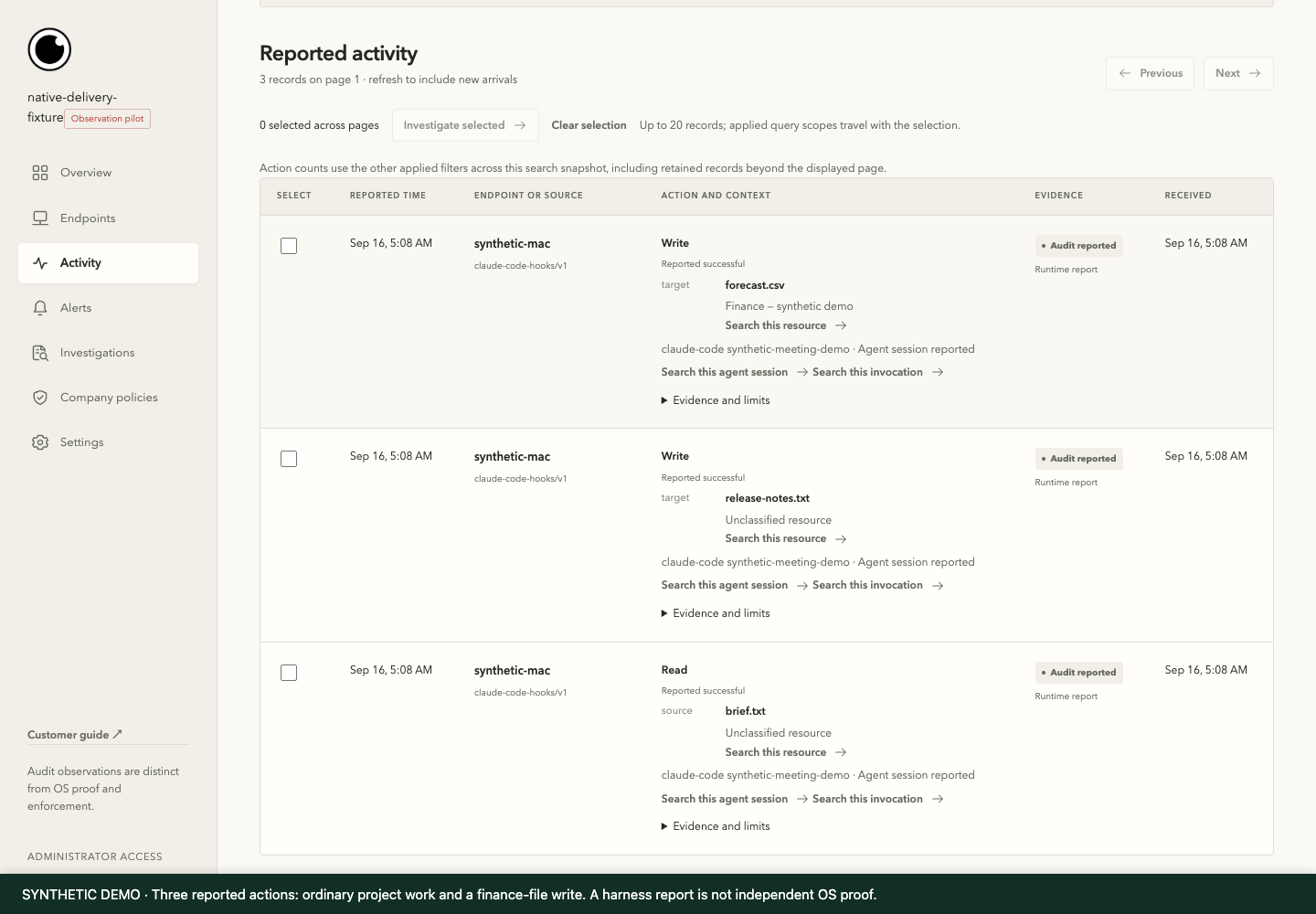
See how a security team reviews an unexpected finance-file change, checks the evidence, and brings the employee into the conversation.

Scroll to follow the investigation

Gensee activity screen using synthetic demonstration data. Numbered annotations explain the important evidence. 1 2 3

01 / Activity

See the activity behind an alert.

  1. The action that needs review

    See what the agent did and the outcome it reported.

  2. The affected file

    A finance-file change appears alongside the team’s ordinary project work.

  3. The source of the evidence

    See which details came from the agent and which were independently observed.

View full-size screenshot
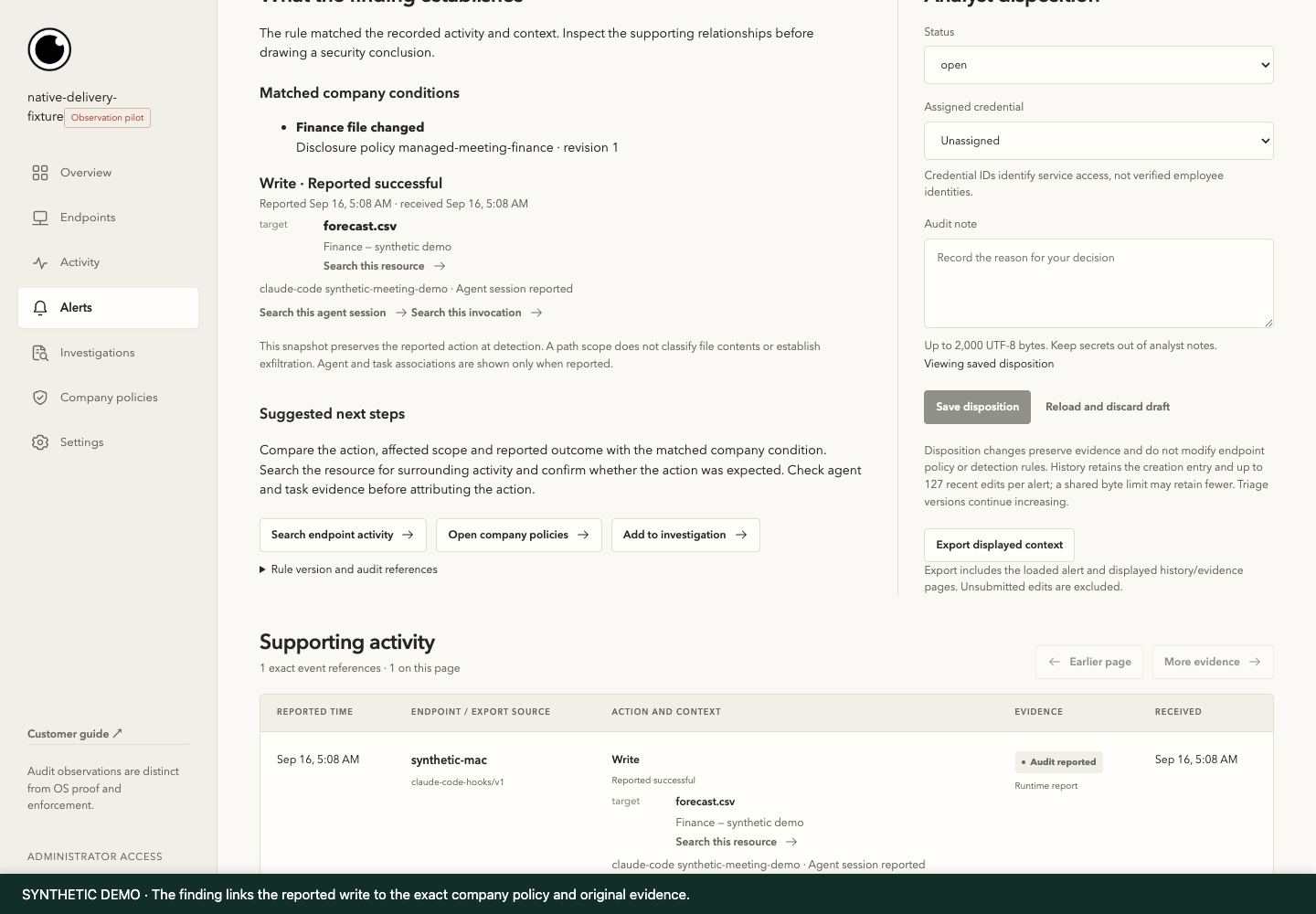
Gensee policy & alert screen using synthetic demonstration data. Numbered annotations explain the important evidence. 1 2 3

02 / Policy & alert

Understand why the action matters.

  1. The matched policy

    See which company policy applies and why the action needs attention.

  2. The action and target

    Inspect the reported write to forecast.csv and its source context.

  3. The next decision

    Carry the finding and its supporting evidence into an investigation.

View full-size screenshot
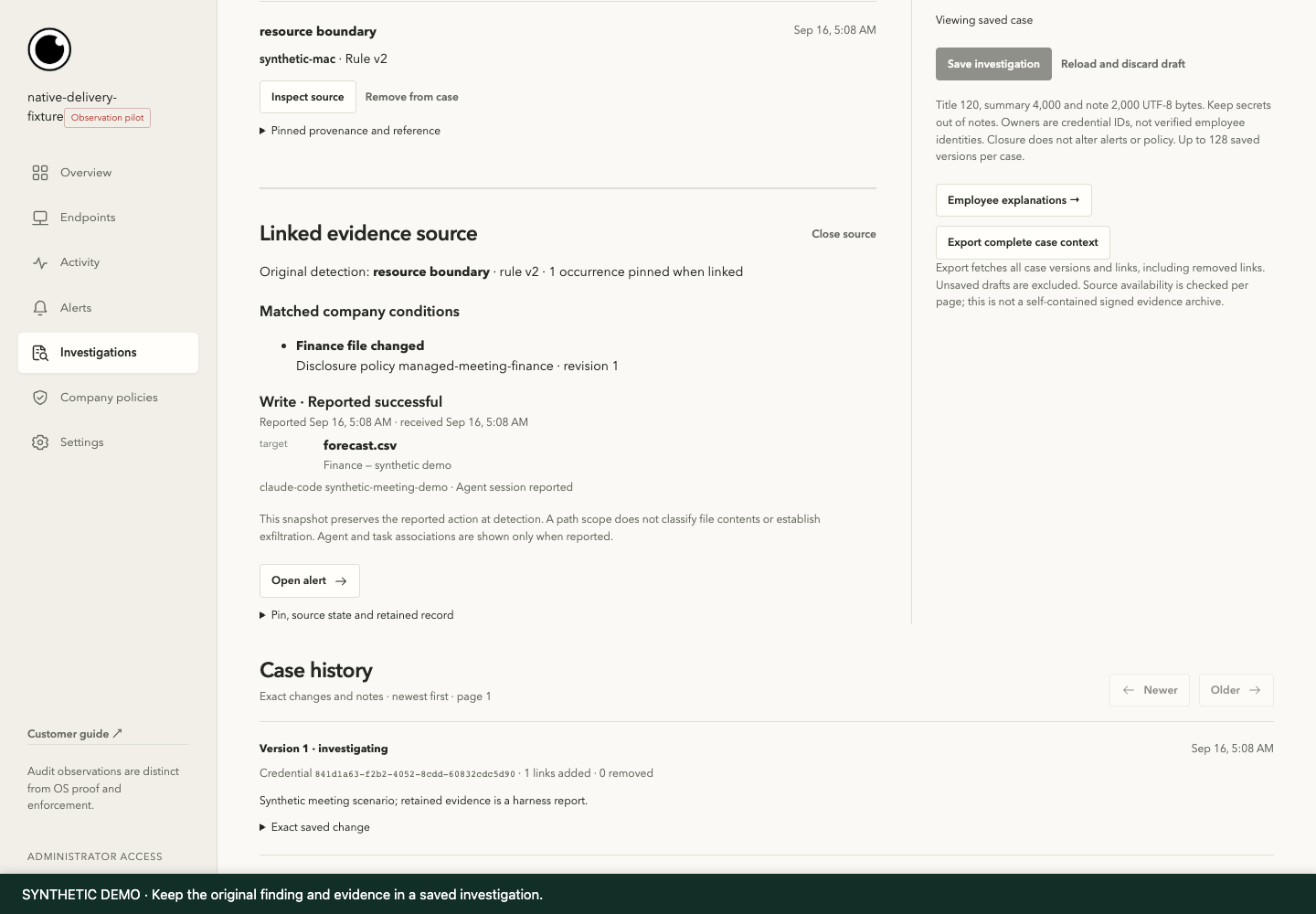
Gensee investigation screen using synthetic demonstration data. Numbered annotations explain the important evidence. 1 2 3

03 / Investigation

Keep the evidence connected.

  1. The original finding

    Keep the original alert and related activity together.

  2. The supporting action

    Review the resource, reported outcome, and matched condition together.

  3. The case history

    Preserve a record of changes and assessments as the investigation develops.

View full-size screenshot
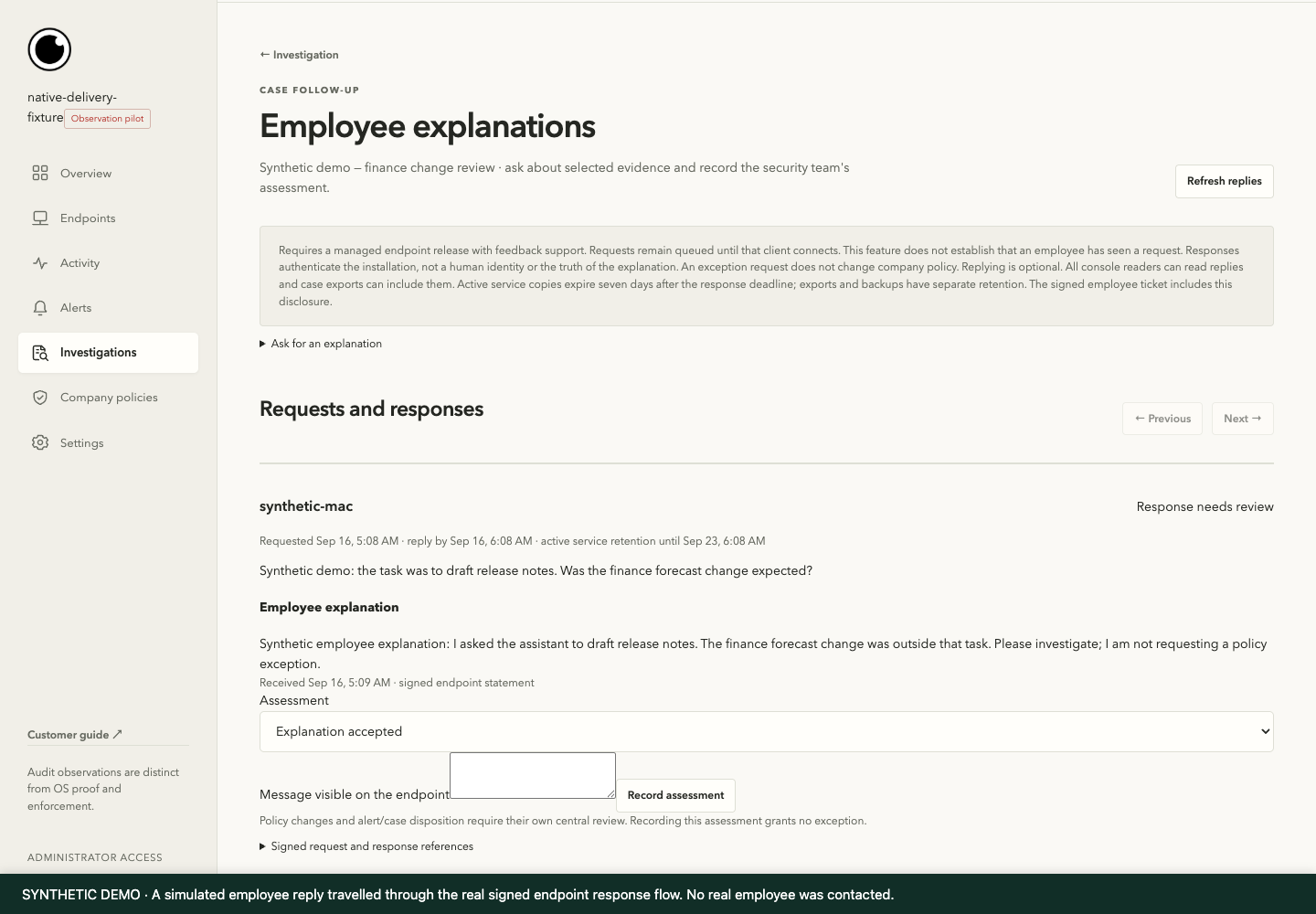
Gensee employee context screen using synthetic demonstration data. Numbered annotations explain the important evidence. 1 2 3

04 / Employee context

Give both sides a voice.

  1. A focused question

    Ask the employee about the task and the change under review.

  2. The employee explanation

    Retain the response alongside the investigation evidence.

  3. The analyst assessment

    Document the decision. An explanation does not automatically change policy.

View full-size screenshot

Actual product · synthetic demonstration. The console and evidence workflow are real; source reports and the employee explanation are simulated. These screens demonstrate investigation, not preventive blocking.

Watch the captioned walkthrough

Silent walkthrough with on-screen captions. The annotated screens above provide a text alternative for the workflow.

Preliminary benchmark results

More threats caught.
Fewer false alarms.

Published test frameworks help us evaluate protection and detection. In our internal ADR-Bench evaluation, Gensee improved recall and accuracy while reducing false positives.

92.9%RecallBaseline 73.8%

11.5%False-positive rateBaseline 13.8%

89.1%AccuracyBaseline 84.5%

Gensee’s internal evaluation on Uber ADR-Bench. Results are specific to the evaluated configuration.

Explore the benchmarks and methodology
01 / AGENTCANARY

Higher defense rates.

Baseline and Gensee results across three evaluated threat categories. Higher is better.

About AgentCanary

Memory poisoning

Baseline75.0%
With Gensee93.8%

+18.8 percentage points

Long-horizon tasks

Baseline65.4%
With Gensee100.0%

+34.6 percentage points

Prompt injection

Baseline77.8%
With Gensee93.5%

+15.7 percentage points

Gensee’s internal evaluation using an adapted AgentCanary harness; these are not official leaderboard results.

02 / UBER ADR-BENCH

Better detection.
Less noise to investigate.

We achieve higher recall and accuracy with a lower false-positive rate on the Uber ADR-Bench dataset.

About Uber ADR
MetricBaselineWith GenseeChange
Recall Higher is better73.8%92.9%+19.1 pp
False-positive rate Lower is better13.8%11.5%−2.3 pp
Accuracy Higher is better84.5%89.1%+4.6 pp

Recall measures how many positive cases are detected. False-positive rate measures how often negative cases are incorrectly flagged. “pp” means percentage points. Baseline refers to the configuration recorded in Gensee’s internal evaluation, not Uber’s production system.

REPORTED RUNTIME OVERHEAD

Protection with workflow impact in view.

0.6%–1.2%runtime overhead

10–400 msper request

Visibility, safeguards, and response

Keep AI work moving.
Stay in control.

Know what agents are doing, protect sensitive work, and give your security team the context to act.

See it in your workflow
  1. 01
    Observe

    See the work clearly.

    Review agent activity and the files, tools, and applications involved in a task.

    Understand where attention is needed.
  2. 02
    Prevent

    Protect what matters.

    Set policies for sensitive data and business actions. Apply safeguards before risky work goes further.

    Keep approved work moving within clear limits.
  3. 03
    Detect

    Focus on meaningful risks.

    Surface suspicious behavior with the context of the task, so teams can assess the activity behind an alert.

    Make better-informed security decisions.
  4. 04
    Investigate

    Know what happened.

    Bring related activity, policy decisions, and employee context together in one investigation.

    Give teams a clear record for response.
Before we get started

Gensee Crate Enterprise FAQ.

Answers for the people doing the work—and the people protecting it.

What is Gensee Crate Enterprise?

Gensee Crate Enterprise helps companies use AI agents safely. It brings company policies, agent activity, safeguards, and investigations together across employee devices, business applications, and cloud workspaces.

How does Gensee support Agent Detection and Response (ADR)?

Gensee connects suspicious agent activity with the task, relevant policies, and supporting evidence. Security teams can review related findings together, understand what happened, and decide how to respond.

Read our guide to AI agent security and ADR ↗

Who is Gensee Crate Enterprise for?

Teams with agents that already read sensitive information, run code, or change business systems. Operations and support are a natural starting point, with analytics, finance, and engineering workflows also in scope. The operational owner, platform or IT team, and security team define the boundaries together.

Which agents and tools can I use with Gensee?

Gensee works with supported coding agents, automation agents, and cloud platforms. These include Claude Code, Codex, Antigravity, Cursor, GitHub Copilot, Claude Cowork, ChatGPT Work, n8n, OpenClaw, Hermes Agent, Omnigent, Databricks Agent Bricks, Glean, Workday, Atlassian Rovo, AWS Bedrock, and Azure AI Foundry. We confirm available protections for your integrations and deployment.

Where can Gensee Crate Enterprise be deployed?

Gensee supports employee devices running macOS, Windows, or Linux, agents inside business applications, and managed cloud workspaces. Policies, activity review, and investigations come together in a central dashboard.

Explore deployment options ↗

Will normal work require constant approvals?

Approved tasks can proceed under company policies. People are brought in when an action needs attention, so teams can keep routine work moving and review consequential exceptions.

How does Gensee help with risky code and tools?

Gensee can inspect code, packages, and tool activity, flag risks, and help teams choose a safer path. Available safeguards depend on the connected agent and deployment.

Can Gensee reverse every action?

No. Recovery applies to supported local state. It cannot unsend an email, reverse an arbitrary remote transaction, or recall disclosed data. Those effects need controls at the application or resource boundary before they occur.

What can we evaluate with our team?

Start with one workflow. We’ll confirm the supported agents and applications, agree on policies, and demonstrate the controls and evidence available in that setup.

Let’s talk about your workflow.

Bring the task your team delegates.
We’ll help map the boundaries that matter.

Contact us
Gensee Crate Enterprise / AI agent security

Let agents do the work.
Keep your business in control.

Start with the work you already delegate.
See what it takes to protect the path from request to result.