TL;DR: Today we are open-sourcing Gensee Crate, a runtime safety sidecar for unmodified coding agents such as Claude Code, Codex, and Omnigent. Crate's core differentiator is that it goes deeper and longer than typical agent safety tools: deeper into system events, user requests, agent tool calls, skills, and memory; longer across requests and sessions where risk often emerges as a chain rather than a single action. Real-time enforcement happens inside the coding agent's chat interface, while event history, lineage, and provenance can be inspected through a web dashboard and command line.
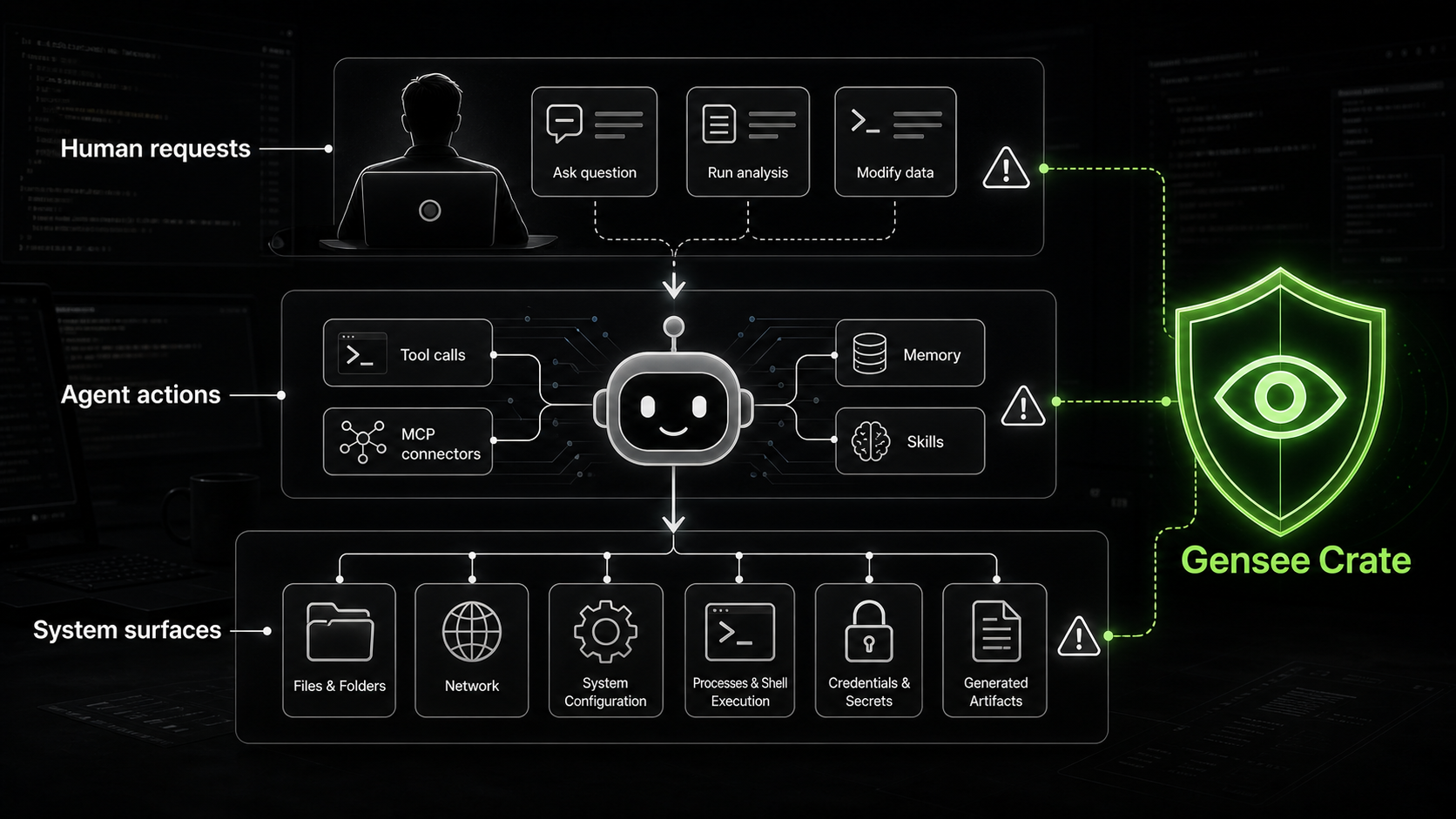
We started building Gensee Crate because of what we saw while operating GenseeAI, our agent hosting platform. Over the past few months, GenseeAI has supported more than 10,000 users running agentic workflows across browsers, files, tools, memory, and long-running sessions. That experience gave us a close look at a pattern that is becoming harder to ignore: once agents move from answering questions to taking actions, safety becomes a runtime problem.
Most agent safety solutions still focus on a narrow slice of the problem: prompt filtering, model guardrails, tool approvals, sandboxing, or single-session activity logs. These controls matter, but they are not enough for the way coding agents are evolving. Modern coding agents do not only produce text. They read and write files, run shell commands, call tools, fetch from the web, invoke skills, retrieve memory, and continue work across long-running sessions. The safety question is no longer just "Was this prompt or response safe?" It is "What did the agent do across the system stack, and how did those actions connect over time?"
Crate is built around deeper and longer visibility. Deeper means observing the runtime layers where agent actions become system effects. Longer means preserving the provenance needed to understand multi-turn, cross-session behavior instead of judging events in isolation.
Why the old mental model is too shallow
A prompt log can tell you what the user asked, and a final answer can tell you what the agent said. Neither gives the full story of what happened on the machine. In real agent workflows, the important safety signals are often below the chat layer: the files an agent touches, the commands it runs, the tools it calls, the skills it invokes, the memory it retrieves, and the system events that occur around those actions.
This is where Crate goes deeper. It does not treat the model response as the only object worth inspecting. It watches the runtime environment around the agent, then relates the user request, the agent's intended tool use, the system-level effect, the policy decision, and the resulting provenance. A tool call that looks safe in isolation may mean something different after an environment file was read, a suspicious memory was retrieved, or a generated script started moving context into another destination.
Depth matters because coding agents are becoming system actors. They touch repositories, terminals, package managers, browsers, local configuration, cloud credentials, MCP servers, generated artifacts, and internal tools. If an agent can affect those layers, the safety system needs visibility into those layers. Otherwise, it is reviewing the shadow of the action rather than the action itself.
Why the current turn is too short
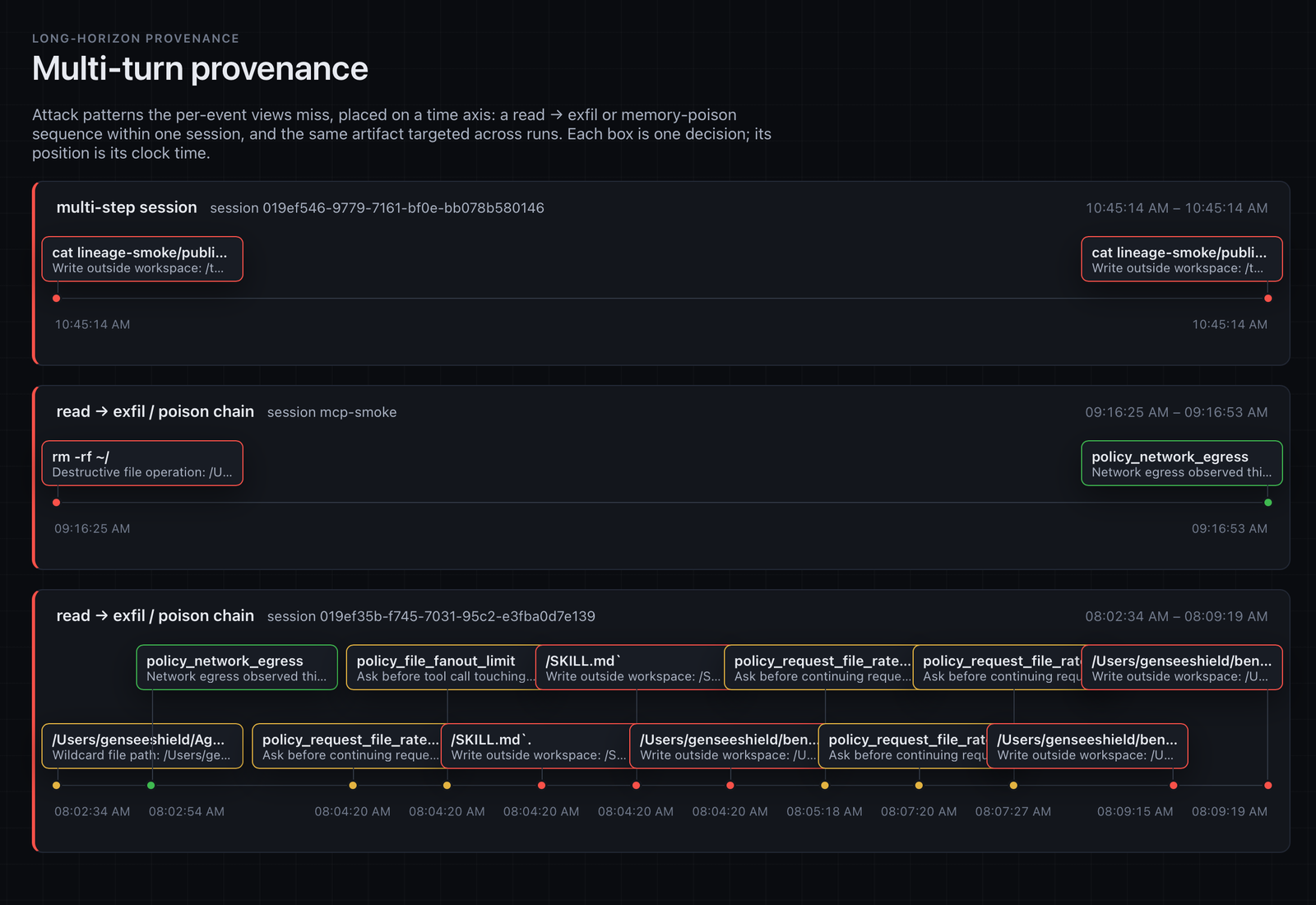
The second problem is time. Some agent risks do not happen in one prompt, one command, or one tool call. They build gradually as memory, context, permissions, files, generated artifacts, and tool responses accumulate. A memory entry may influence a later tool call. A file read may flow into generated code. A harmless command may become risky when connected to earlier access to credentials or environment files. A tool response may contain sensitive context that gets reused downstream.
The risk is often not the single event. The risk is the chain. This is why single-turn safety checks are incomplete for long-running coding agents. Agents increasingly behave less like stateless functions and more like persistent collaborators: they remember, adapt, continue tasks, and reuse prior assumptions. That persistence is useful, but it creates a safety surface that requires long-horizon provenance.
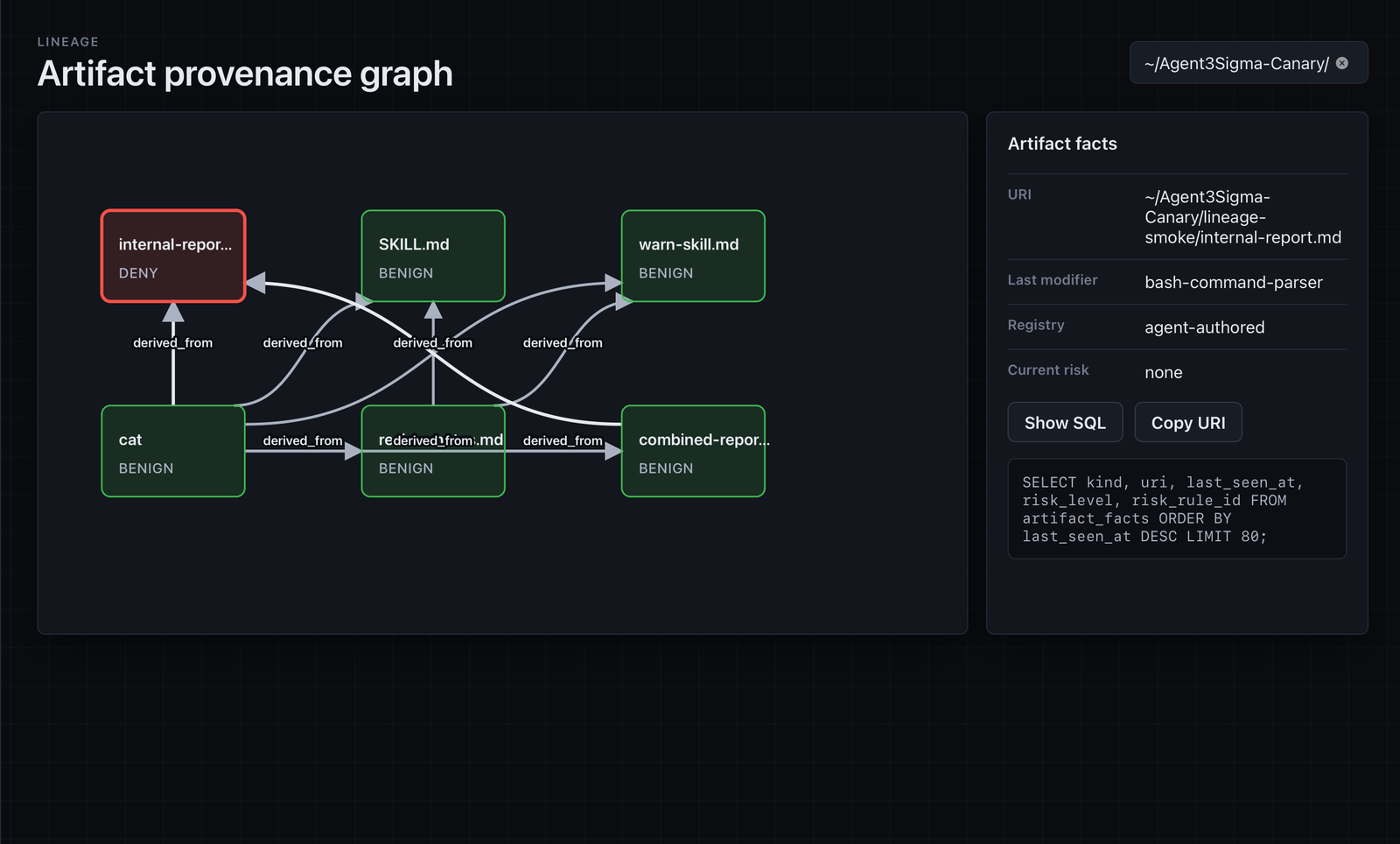
Crate follows agent behavior across requests and sessions so developers can understand not just what happened last, but how the agent got there. It helps answer questions such as whether a previous memory influenced the current action, whether the agent gradually expanded scope across sessions, whether sensitive context flowed from a file read into a generated artifact, and whether a sequence of safe-looking actions composed into risky behavior.
A concrete example
Imagine a coding agent working across several sessions. In one session, it is asked to debug a backend issue and reads several configuration files. Later, it stores a memory suggesting that environment configuration should always be inspected before backend changes. In a future session, the user asks for a feature implementation, and the agent retrieves that memory, reads .env, checks cloud configuration, generates deployment-related code, and calls a tool with that context.
Each step might be defensible if reviewed alone. Together, they raise a different set of questions: Was the environment file relevant to the new task? Did memory expand the agent's scope? Did sensitive configuration influence generated artifacts? Did the agent touch files outside the expected workspace? Should the developer have been asked before that context was reused?
This is the kind of behavior Crate is designed to surface. Not just the last command, but the path that made the command possible.
Real-time enforcement, offline provenance
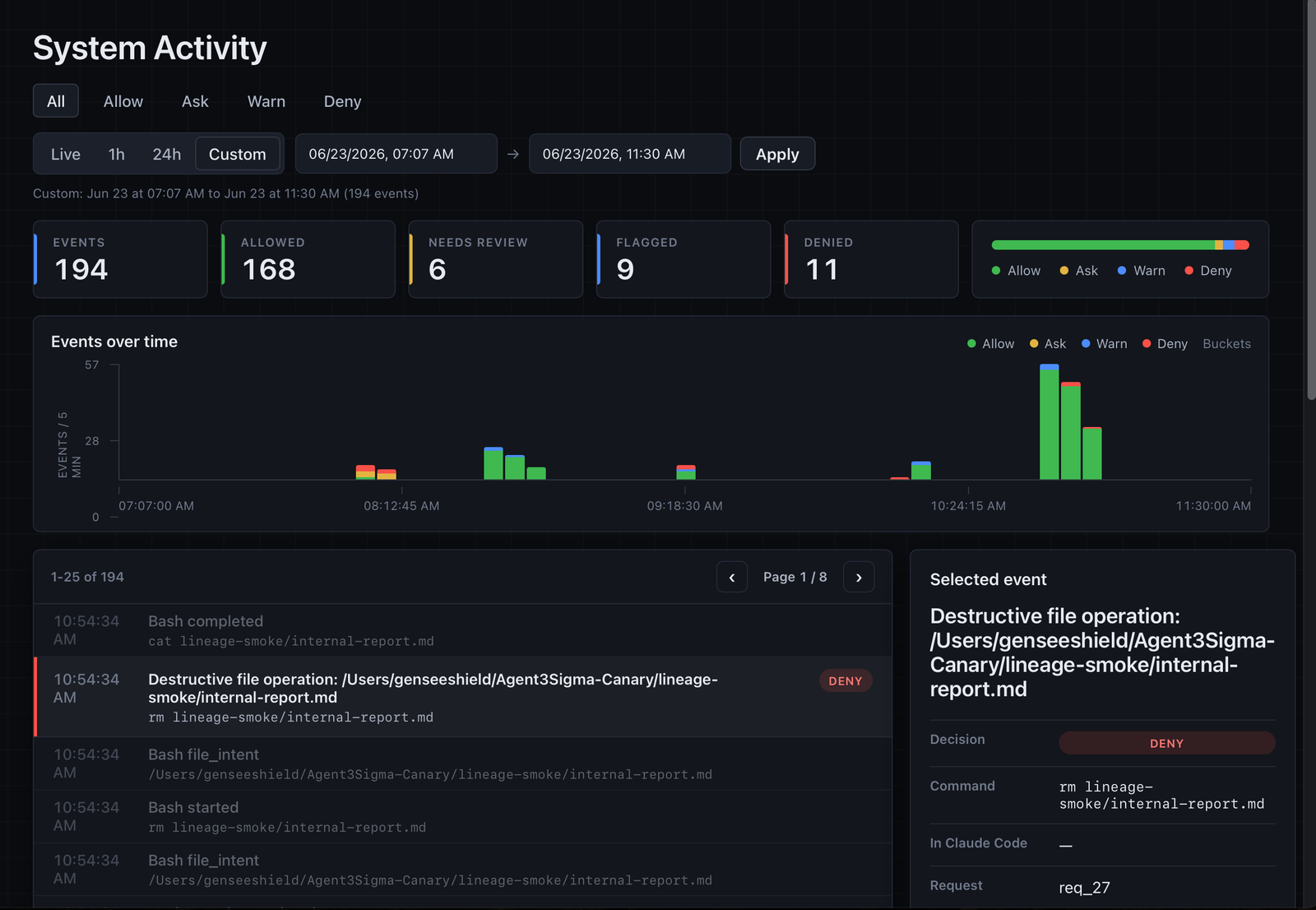
Crate has two complementary modes. First, it supports real-time enforcement inside the coding agent's chat interface. When a policy-relevant event happens, the developer can review or block the behavior in the same flow where they are already working with the agent. Second, Crate preserves event history, lineage, and provenance so developers and teams can inspect what happened later through a web dashboard or command line.
This split is important. Real-time enforcement helps prevent risky actions before they silently proceed, while offline provenance helps teams understand how behavior unfolded, debug agent decisions, review policy outcomes, and trace how context moved through the system. The immediate control and the long-horizon record reinforce each other.
What the first release includes
The first open-source release includes runtime event monitoring, hooks for coding-agent workflows, policy checks, real-time enforcement, event history, lineage tracking, provenance views, a web dashboard, and command-line inspection. Developers can use Crate to understand what their agent did during a session, trace how actions connect across sessions, and define review points around behavior that should not run silently.
For example, teams may want to warn when an agent reads credentials-like files, runs commands outside the expected workspace, changes permissions, installs packages, touches deployment paths, or uses sensitive context in downstream tool calls. The goal is not to make agents unusable. The goal is to make their risky edges visible and controllable, because good coding agents are useful precisely because they take action.
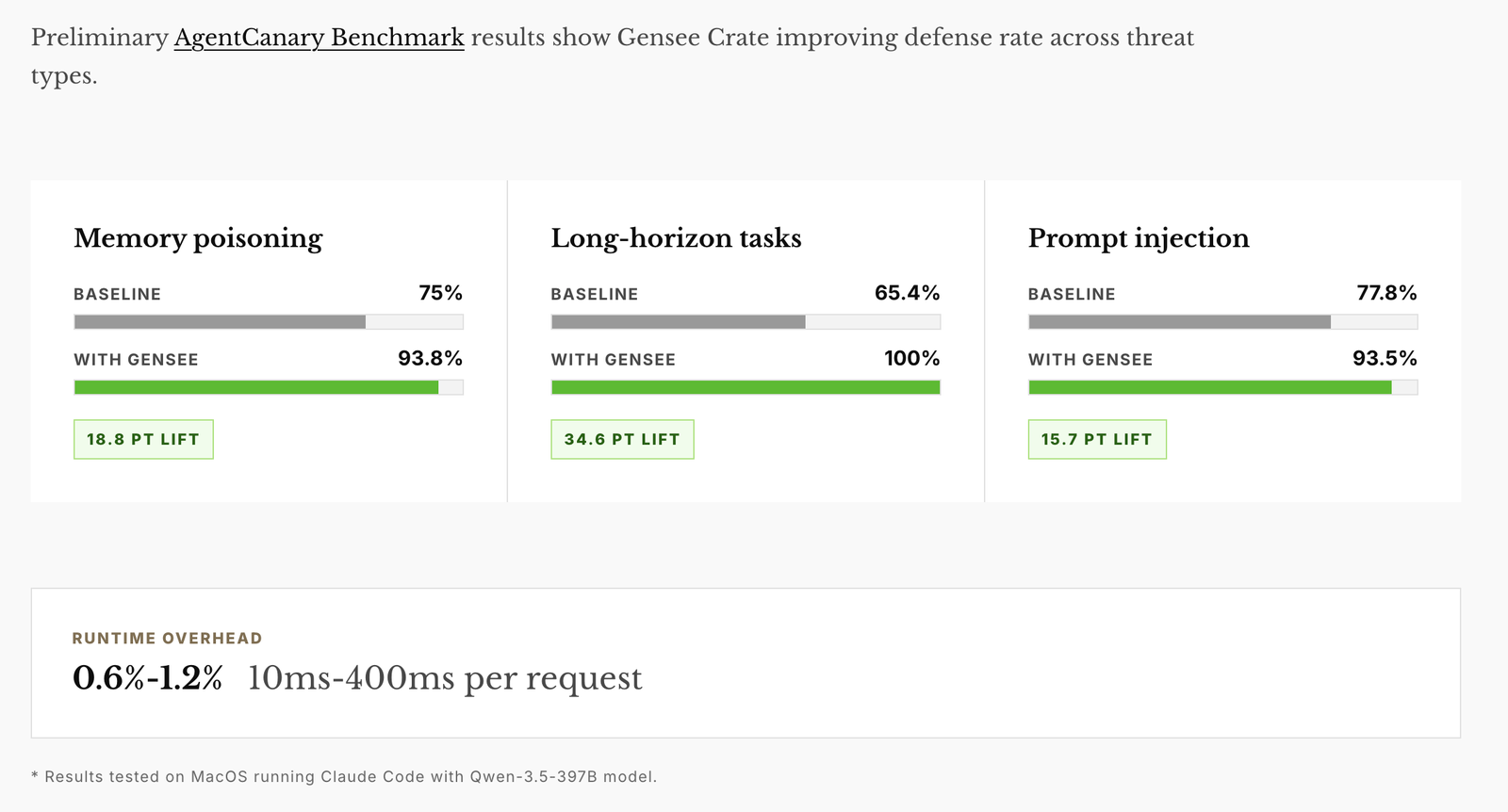
Who Crate is for
Crate is built for developers and engineering teams using coding agents in real workflows. It is especially relevant when agents can read and write files, run shell commands, use tools or MCP servers, access browsers, retrieve memory, invoke skills, work across long-running sessions, or interact with internal systems and sensitive local context.
For individual developers, Crate helps answer: "What did my agent actually do?" For teams, it helps answer: "How do we let agents work productively while maintaining visibility, policy, and provenance?" For security and platform teams, it helps reveal where prompt-level, model-level, and tool-level controls stop, and where runtime behavior begins.
Why open source
We are open-sourcing Gensee Crate because agent runtime safety needs to be inspectable. Developers should be able to see what is tracked and why. Security teams should be able to test policies against real workflows. AI platform teams should be able to understand how runtime events, memory, tool calls, and provenance interact in practice.
The open-source release is our starting point for developers and small teams. For enterprises, we also offer company-wide policy distribution, identity and auth, central event upload, admin dashboards, audit trails, policy versioning, private deployment options, MCP and tool-gateway protection, sensitive data boundary design, and long-horizon retention. But the core principle is the same across both: coding-agent safety needs to go deeper into the runtime and longer across time.
Coding agents are quickly becoming part of everyday software development. They are moving from suggestion engines to active participants in engineering work. That shift is powerful, and it changes the safety model. When agents take actions across files, commands, tools, memory, and sessions, safety can no longer live only at the prompt layer. It needs runtime visibility. It needs provenance. It needs to connect events across time.
Frequently asked questions
What is Gensee Crate?
Gensee Crate is an open-source runtime safety sidecar for unmodified coding agents such as Claude Code, Codex, and Omnigent. It watches user requests, tool calls, skills, memory, and system events, then connects behavior across requests and sessions.
How is it different from other agent safety tools?
Crate is designed around deeper and longer visibility: deeper into runtime and system-level events, and longer across multi-turn, cross-session behavior where risk often emerges as a chain rather than a single action.
Where does enforcement happen?
Real-time enforcement happens inside the coding agent chat interface. Event history, lineage, and provenance can be inspected later through the web dashboard and command line.
Is it open source?
Yes. Gensee Crate is open source and available on GitHub.