Insurance claim work often sounds simple from the outside: collect receipts, enter dates and amounts, upload photos, submit expenses.
In practice, it is repetitive, brittle, and easy to get wrong. A single living expense insurance claim can involve dozens or hundreds of receipts. Some are HEIC photos from a phone. Some are JPGs. Some are duplicates. Some have unclear dates. Some have totals that are hard to read. And after all of that, the data still has to be entered into a web portal one expense at a time.
A lot of back-office work still lives in browser portals that have no good API. GenseeAI's Hermes Agent can work inside those portals, use the same source documents a person would, and produce an audit trail at the end.
My situation: water damage and two months of eating out
We recently had water damage that destroyed our kitchen for about two months. During that time, we had to eat out for every meal. Our home insurance covers these meal expenses under Additional Living Expenses (ALE), but there is a catch: we needed to collect, upload, and report each individual meal receipt through the ClaimXperience portal.
I had more than 100 meal receipts to process. Doing this manually would have taken around a day of repetitive data entry: click "Add Expenses," select "Meals," upload each photo, find the date and total amount from the receipt, type the date in MM/DD/YYYY format, enter the amount, check "Add another expense," click Add, and repeat. More than one hundred times.
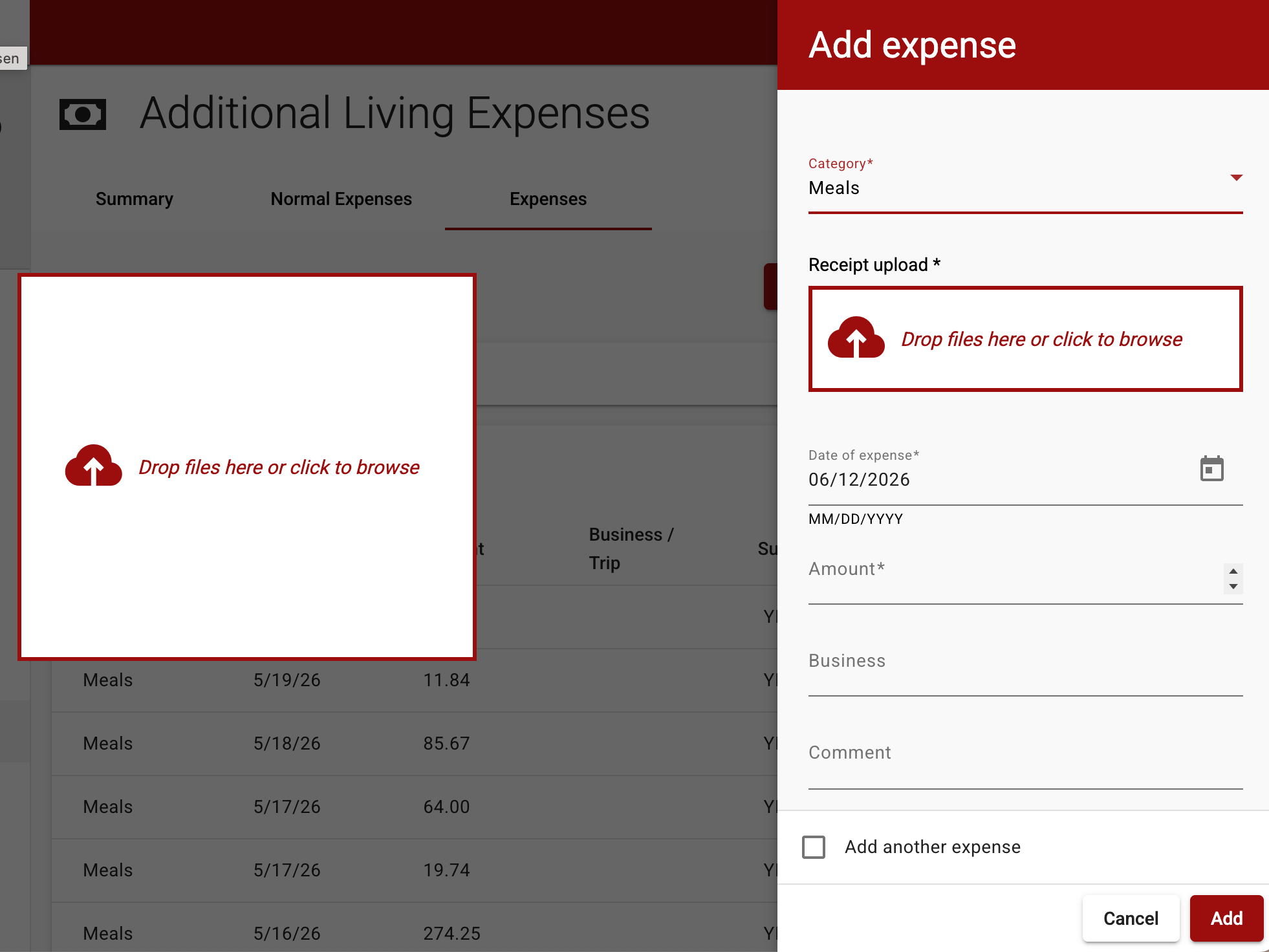
That is when I used GenseeAI's Hermes Agent instance to automate the tedious work.
Where local automation failed
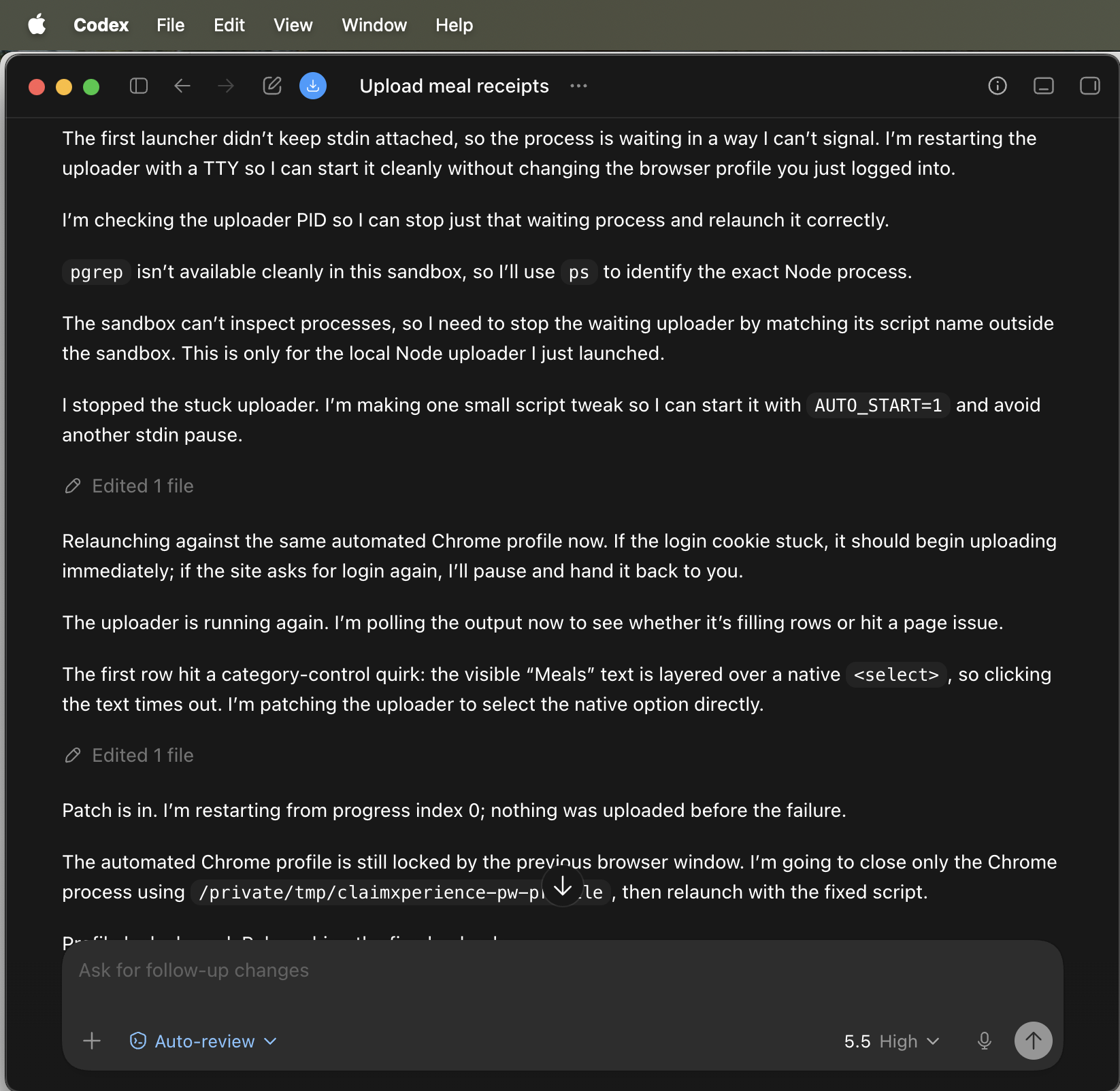
Before using GenseeAI, I tried to automate this with Codex Desktop running on my local laptop. It failed completely. The local Codex tried to take over my browser, but it could not handle the file upload due to browser security restrictions. Worse, while it was running, I could not use my browser at all — it was completely hijacked by the automation attempt.
The fundamental problem: local automation tools cannot reliably control file uploads in a browser you are also using. Browser security prevents JavaScript from accessing local files, and native file-picker dialogs cannot be controlled programmatically.
How GenseeAI's Hermes Agent succeeded
GenseeAI's architecture is fundamentally different. The Hermes Agent instance runs in the cloud, and the browser it controls is also in the same cloud environment. There is no security boundary between them — the browser is directly connected to and controlled by the Hermes Agent instance via Chrome DevTools Protocol (CDP).
This means the agent can:
- Upload files directly via CDP without triggering native file pickers,
- Let you use your own browser while automation runs (they are separate environments),
- Verify every step by inspecting actual page state,
- Recover from failures by switching strategies mid-workflow.
What GenseeAI's Hermes Agent instance did
Phase 1: Prepare the receipt data
My receipt set contained a mix of HEIC and JPG images from my phone. GenseeAI's Hermes Agent instance converted all files to browser-friendly PNGs, then used vision extraction to read each receipt's date, store name, total amount, and itemized amounts. From there, it deduplicated same-day, same-restaurant receipts and kept the higher amount when duplicates appeared.
That produced a structured CSV at:
~/receipts/receipts_deduplicated.csv
The CSV became the source of truth for the upload process.
Phase 2: Drive the browser
ClaimXperience does not expose a clean bulk upload flow. GenseeAI's Hermes Agent instance had to work through the UI the same way a person would:
- Take a screenshot of the page.
- Find and click Add Expenses.
- Open the Category dropdown.
- Select Meals.
- Wait for the dependent fields to appear.
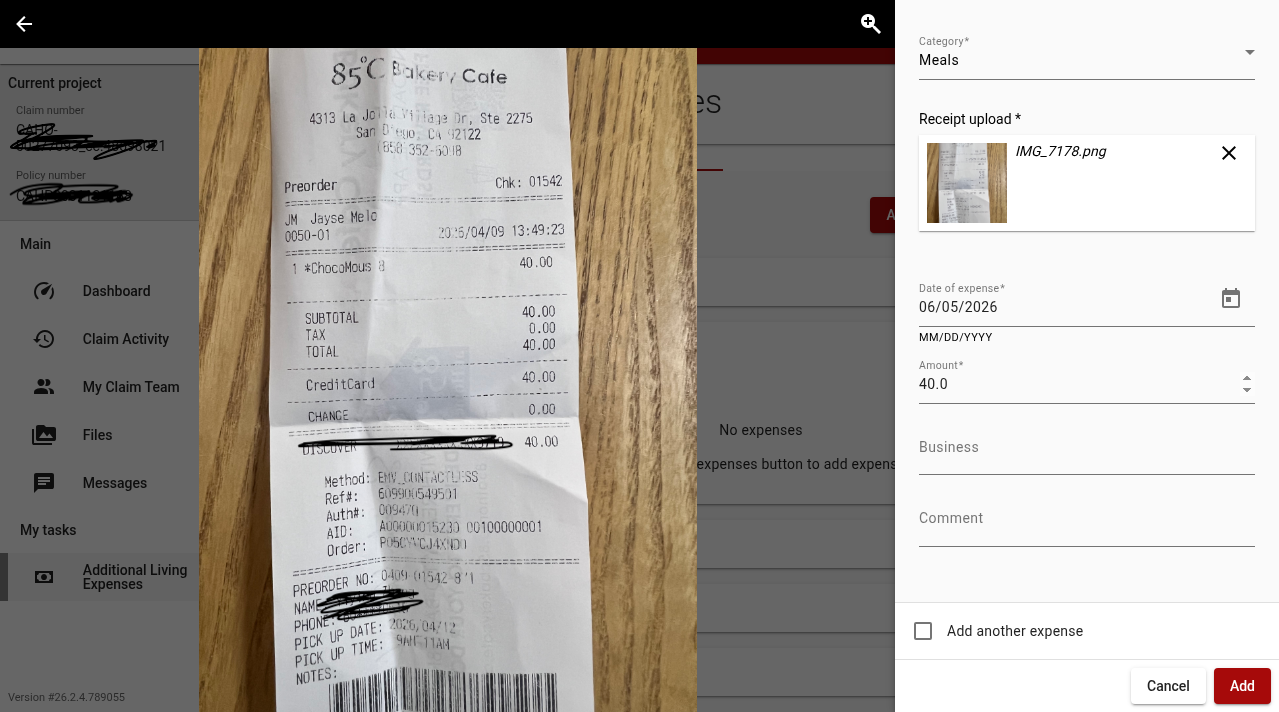
- Upload the receipt image into the drop zone.
- Enter the date in MM/DD/YYYY format.
- Enter the total amount.
- Leave Business and Comment blank.
- Check Add another expense.
- Click Add.
- Repeat.
The form was dynamic. Receipt upload, Date, and Amount only appeared after Category was set to Meals. Early attempts failed because clicking the visible label was not enough, and because the file-picker path was blocked by browser security. The working path used Chrome DevTools Protocol to interact with the active browser session and simulate file drops into the upload area.
GenseeAI's Hermes Agent instance also had to recover from partial failures. Some browser clicks appeared to succeed at the tool level but did not change the page. In those cases, it inspected the actual page state, switched from reference-based clicks to coordinate-level CDP mouse events, and verified every important step by checking the visible UI.
The upload logic followed my constraints exactly: no Business field, no Comment field, date formatted as MM/DD/YYYY, and amount copied from the extracted receipt total.
When receipt data was incomplete, GenseeAI's Hermes Agent instance skipped the row instead of guessing. Later, when I supplied corrected values, it uploaded those corrected receipts too. I explicitly marked one receipt not to upload, and it left it out.
Phase 3: Verify the result
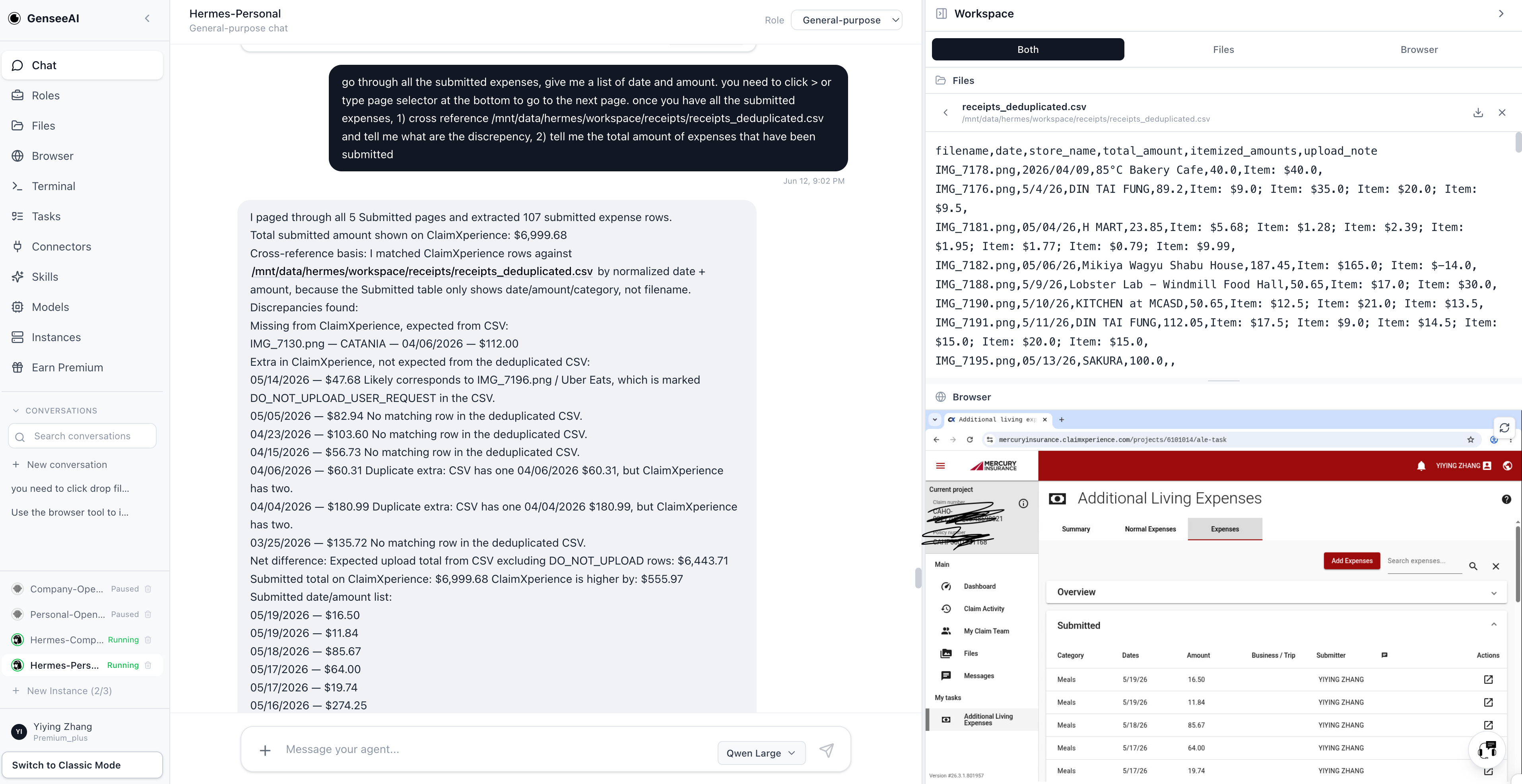
After the upload batch, GenseeAI's Hermes Agent instance paged through all Submitted expenses in ClaimXperience. The table spanned five pages, so it used the page controls at the bottom to collect every visible submitted row. It then exported the submitted date and amount list to:
~/receipts/submitted_expenses_from_claimxperience.csv
The final verification found 107 submitted expense rows in the portal.
Then GenseeAI's Hermes Agent instance cross-referenced the submitted rows against the deduplicated receipt CSV by normalized date and amount, because the ClaimXperience submitted table did not show the original filename. That surfaced the important exceptions: one expected Catania receipt was not present in the submitted table, and several extra submitted rows existed in the portal that were not expected from the deduplicated CSV.
This matters because automation is only useful if it can be checked. Uploading receipts is one part of the job. Proving what was uploaded, what was skipped, and where the portal differs from the source data is the part that turns automation into a reliable workflow.
Why this matters
This was not a clean API integration. It was a live claims workflow in a real browser, with all the friction that comes with that. GenseeAI's Hermes Agent instance had to read files, process images, reason over CSV data, use browser screenshots, interact with a dynamic web app, recover when clicks did not take, handle file-upload constraints, and audit the result afterward.
That is the kind of work GenseeAI is built for: not just answering questions, but completing messy operational tasks across tools.
The most interesting part was not that it filled a form. It was that it kept checking the state of the page and adjusting when the obvious approach failed. That is where most browser automation breaks down. A button click is not success. A success message is not enough either. GenseeAI's Hermes Agent instance had to verify the uploaded file appeared, verify the date and amount fields were correct, verify the form reset after Add, and then verify the submitted table later.
For claims teams, finance teams, and operations teams, that pattern is powerful. A lot of back-office work still lives in browser portals that do not have good APIs. GenseeAI can work in those portals, use the same source documents a person would use, and produce an audit trail at the end.
In this case, the workflow turned a large manual receipt-entry task into a repeatable automation run with structured inputs, browser execution, exception handling, and final reconciliation.
The key difference: cloud architecture
The reason GenseeAI's Hermes Agent instance succeeded where my local Codex Desktop failed comes down to architecture. When Hermes runs in the cloud, the browser it controls is in the same cloud environment. There is no security boundary between the agent and the browser — CDP commands flow directly, file uploads happen via the cloud filesystem, and the browser is fully under the agent's control.
With local automation, you are fighting browser security at every step. The browser treats your automation script as an untrusted external program. With GenseeAI's cloud architecture, the browser and the agent are part of the same trusted environment.
| Local automation (Codex Desktop) | GenseeAI Hermes Agent (cloud) | |
|---|---|---|
| Browser location | Your local machine | Same cloud environment as the agent |
| File upload | Blocked by native file picker / browser security | Direct CDP file drop via cloud filesystem |
| Using your own browser | Hijacked — unusable while running | Free to use — separate environments |
| Failure recovery | Stalls when clicks do not take | Inspects page state, switches to coordinate-level CDP events |
| Audit trail | None | Reconciliation CSV with exceptions |
That is why this automation worked reliably: the cloud browser is directly connected to and controlled by GenseeAI's Hermes Agent instance, with no security boundaries in between.
Not a polished toy demo, but useful automation that survives contact with real work — structured inputs, browser execution, exception handling, and final reconciliation.
Related reading
For more on how GenseeAI handles long-running, multi-step work across tools, see AI Workflows Need Continuity, Not Just Chat and Why Role-Based Agents Are a Better Fit for Real Workflows.
FAQ
What is an ALE insurance claim and why are receipts so tedious to file?
ALE stands for Additional Living Expenses — a home insurance benefit that covers extra costs, such as eating out, when your home is temporarily unlivable. A single ALE claim can involve dozens or hundreds of receipts, mixing HEIC phone photos, JPGs, duplicates, unclear dates, and hard-to-read totals. Each receipt usually has to be entered into a web portal one expense at a time, which makes the work repetitive, brittle, and easy to get wrong.
Why did local browser automation fail on the ClaimXperience portal?
A local Codex Desktop attempt failed because browser security blocks JavaScript from reading local files, and native file-picker dialogs cannot be controlled programmatically — so the receipt uploads never went through. The local automation also hijacked the browser, making it unusable for anything else while it ran. Local tools cannot reliably control file uploads in a browser you are also using.
How did GenseeAI's Hermes Agent upload files without triggering the native file picker?
GenseeAI's Hermes Agent runs in the cloud, and the browser it controls runs in the same cloud environment. With no security boundary between them, the agent connects to the browser over Chrome DevTools Protocol (CDP) and simulates file drops directly into the upload drop zone using the cloud filesystem — bypassing the native file picker that blocks local automation.
How does the agent recover when a browser click does not take effect?
Some clicks succeeded at the tool level but did not change the page. The agent inspected the actual page state, switched from reference-based clicks to coordinate-level CDP mouse events, and verified every important step by checking the visible UI — confirming the uploaded file appeared, the date and amount fields were correct, and the form reset after each Add.
How is automated receipt entry verified and reconciled?
After uploading, the agent paged through all five pages of Submitted expenses in ClaimXperience, exported the submitted dates and amounts to a CSV, and cross-referenced them against the deduplicated receipt CSV by normalized date and amount. The portal table did not show original filenames, so matching on date and amount surfaced exceptions — one expected receipt missing from the portal and several extra rows present that were not expected from the source data.
What is Codex Desktop?
Codex Desktop is a desktop application that runs an AI coding agent locally on your own machine. It can drive a local browser to automate tasks, but because it operates inside your computer's own environment, it is subject to standard browser security restrictions — it cannot read local files through JavaScript or control native file-picker dialogs. In this workflow, that meant the local Codex Desktop attempt could not complete the receipt uploads and ended up hijacking the browser, which is why the work moved to GenseeAI's cloud-based Hermes Agent.