Most AI tools still begin with a blank chat box. That works if your goal is to ask a quick question, get a draft, or explore an idea. But it works much less well when what you actually need is help with a recurring workflow tied to your role.
A founder does not arrive with a blank need.
A marketer does not arrive with a blank need.
A developer, investor, salesperson, or student does not either.
They arrive with context. They already have a role, a set of responsibilities, and a pattern of tasks that tends to repeat over time. That is why, in GenseeAI Guided Mode, we moved toward role-based agents. We believe role-based agents are a better fit for real workflows than generic AI chat.
Instead of starting every user from the same generic interface, Guided Mode can now begin from roles such as:
- Founder
- Investor
- Developer
- Marketer
- Sales
- Student
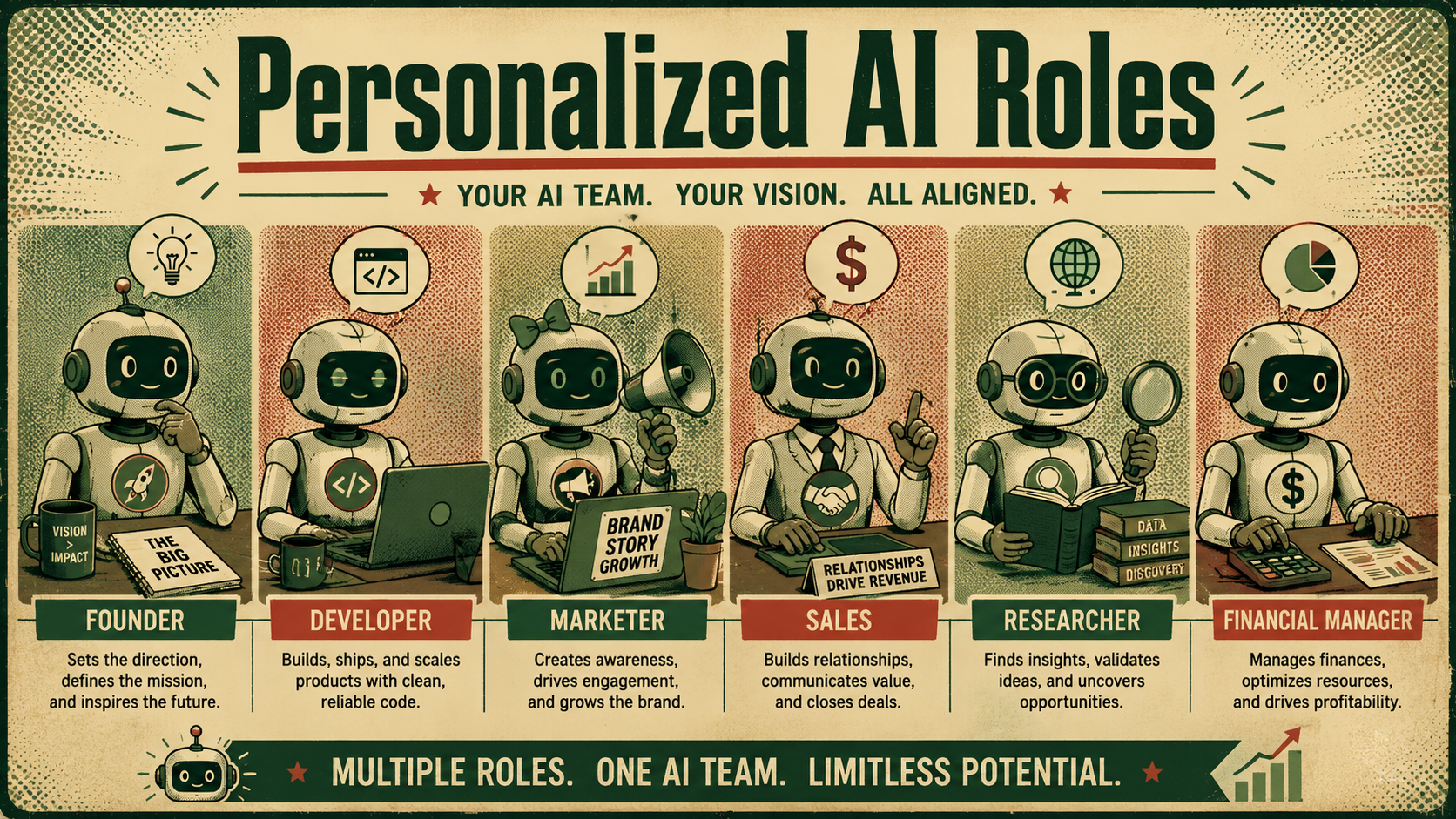
Generic AI chat is flexible, but roles create direction
A blank AI interface has one obvious advantage: flexibility. You can ask anything, try anything, or point it anywhere.
But that flexibility also comes with a hidden cost: the user has to supply all of the structure. For instance, the user has to decide what kind of assistant this should be, what tasks matter most, or what tools it should use.
For a highly technical user, that may be fine. For many people, it means too much of the workflow still lives in their own head. That is the problem role-based agents solve.
A role-based agent starts with more context from the beginning, based on the role you choose. It knows a student may need support with research, studying, writing, and organization. So it provides direction for real workflows.
Real work usually comes in task clusters, not isolated prompts
One of the reasons role-based agents are more useful is that most professional work does not happen as one isolated task at a time. It happens in clusters.
A founder might need:
- competitor watch
- research reports
- social media planning
- lead management
- investor updates
A marketer might need:
- content generation
- multi-channel posting
- campaign analysis
- reporting
- trend research
A developer might need:
- codebase Q&A
- bug tracker and triage
- changelog generation
- documentation workflows
That is why role-based agents in GenseeAI Guided Mode are designed to support task cohorts, meaning groups of tasks that naturally belong to the same role and workflow context.
This is a big difference from generic AI chat. A generic assistant can respond to each request one by one, while a role-based agent can hold onto the larger pattern.
That makes the workflow feel much more coherent.
A role agent should do more than chat
When we say “role-based agent,” we do not mean a chatbot with a nicer label. In Guided Mode, role-based agents are designed to do more than simply wait for the next message. They can be set up with role-specific starting points, relevant skills, connected tools, starter actions, ongoing task context, and memory within the workflow.
This matters because useful AI systems should not always start from zero.
If a marketer agent already has the right skills, understands the relevant task set, and can continue from prior work, it behaves less like a blank assistant and more like a usable workflow partner.
The same is true for a founder agent, developer agent, investor agent, or student agent. The point is to make it more workflow-aware.
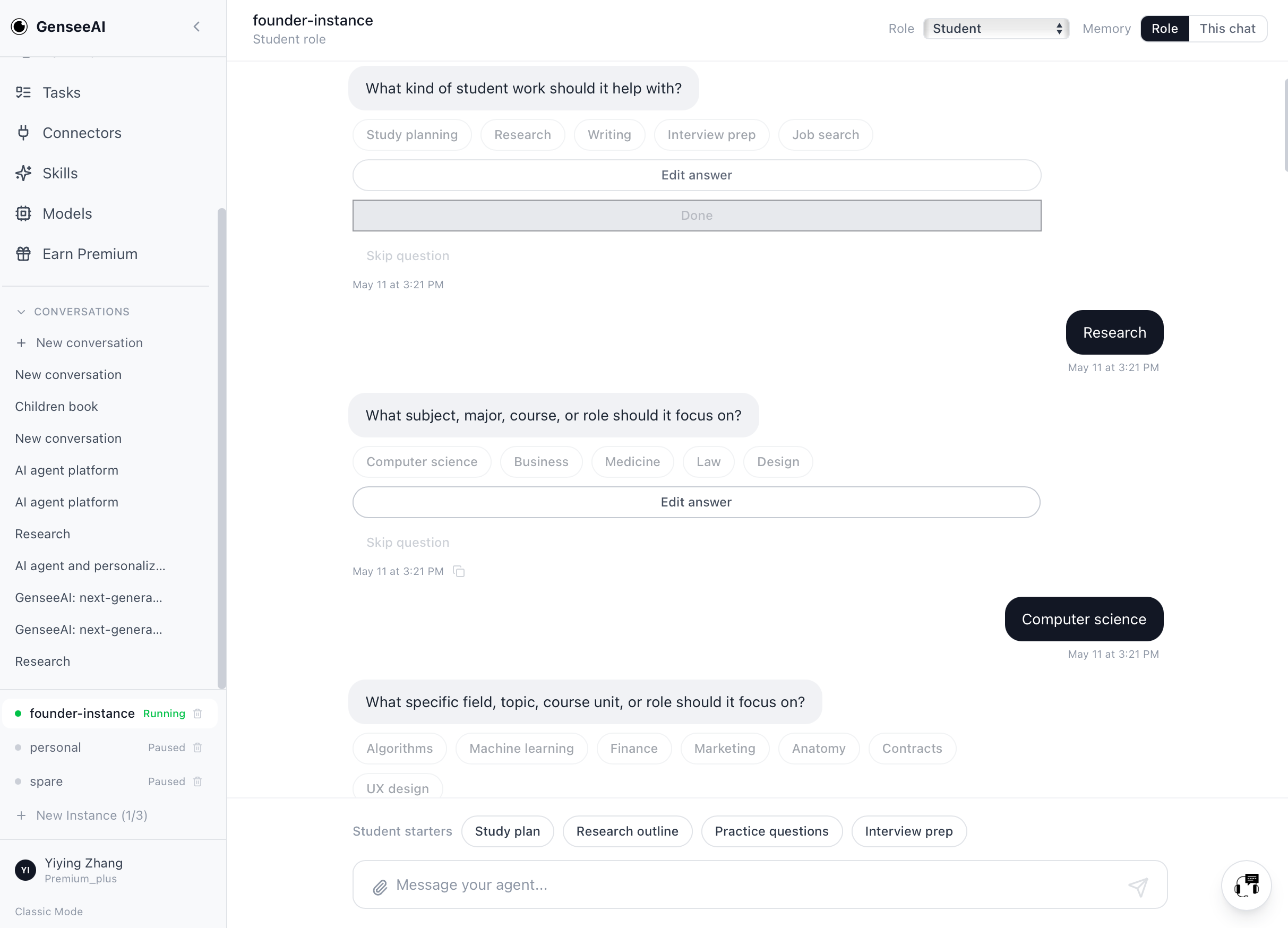
Why memory matters more in role-based agents
Memory is much more valuable when it is attached to a role and a workflow, not just to a general conversation history.
A founder agent benefits from remembering:
- which companies are being tracked
- which reports were already generated
- which outreach tasks are ongoing
- what the user has already prioritized
A developer agent benefits from remembering:
- which repository is in focus
- which issues were already reviewed
- which file structures and workflows matter most
A student agent benefits from remembering:
- the subject area
- prior notes
- the writing context
- recurring goals or assignments
In other words, memory becomes much more useful when it helps the agent continue meaningful work within the same role context.
That is why role-based agents are a better fit for long-term workflows than generic AI chat, since they give memory somewhere more structured to live.
Skills matter because roles need tools, not just language
Another reason role-based agents are more useful is that roles rarely depend on language alone. They depend on tools.
A role agent becomes much more valuable when it can use the right skills and connected services for the work it is meant to support.
For example:
- a founder agent may need research, reporting, files, and outbound workflow support
- a marketer agent may need content, posting, analytics, and campaign-related tools
- a developer agent may need GitHub, documentation, bug tracking, and code-related workflows
In GenseeAI Guided Mode, skills are part of what makes the role meaningful. This helps move the product away from “a general AI that can talk about anything” and closer to “an AI agent that can actually support the work this role needs.”
That distinction is important. Because when people say they want an AI agent, what they often really mean is: they want help with a repeatable set of tasks tied to the work they actually do.
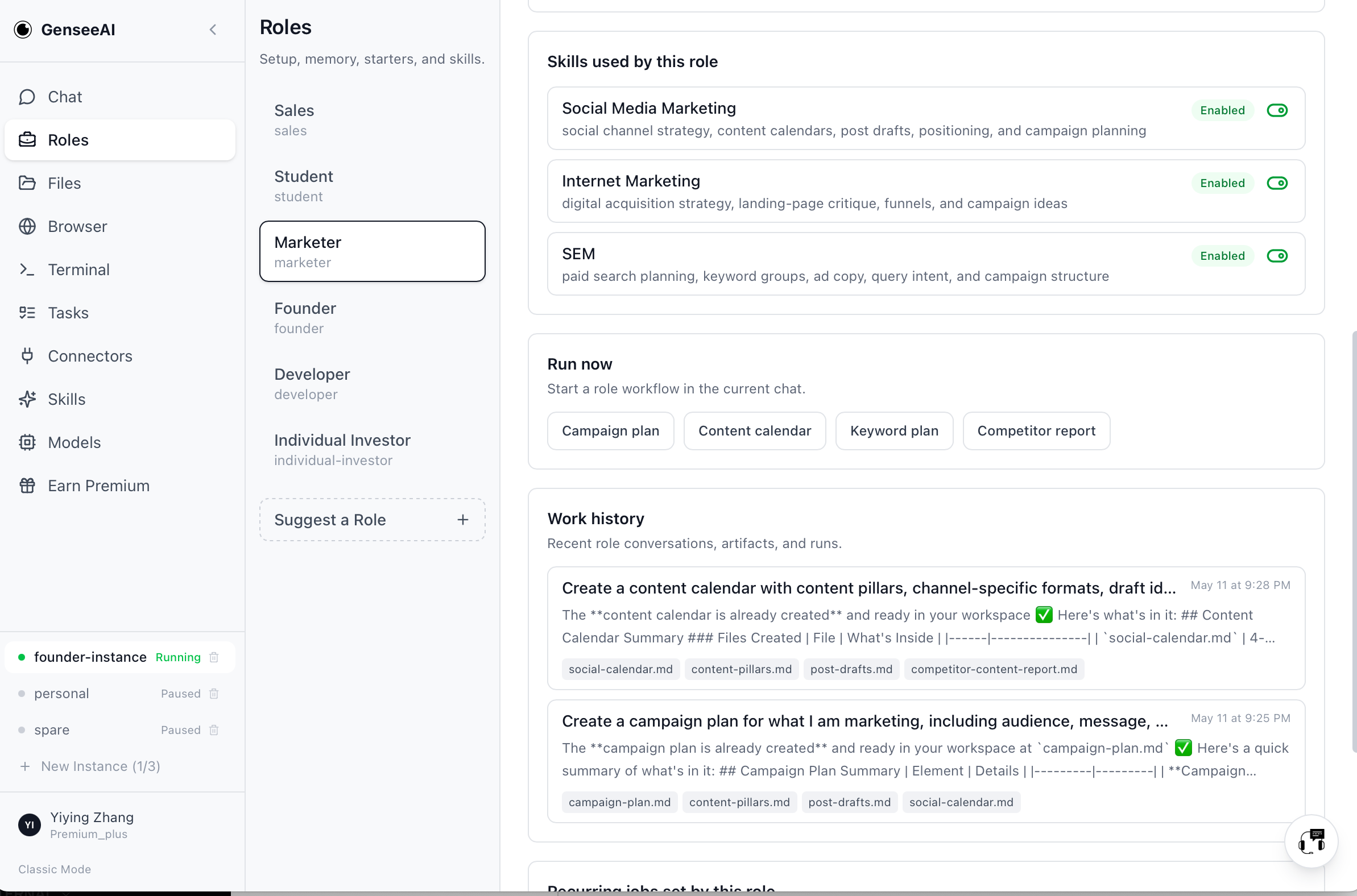
Guided setup makes roles feel useful faster
Role-based agents only help if users can get into them without too much friction. That is why Guided Mode changes how setup happens. Instead of requiring users to learn the structure of the system first, Guided Mode can guide the setup process through buttons, text input, follow-up questions, and easy choices.
This makes role setup feel more like describing a need and less like configuring software.
And it reflects that the value of a role-based agent is not just in what it becomes eventually, but in how quickly the user can get to something useful.
A good setup flow should help users reach relevant tasks, tools, context, and next actions without making them first absorb the full mental model of the platform.
Guided Mode and Classic Mode serve different entry points
It is important to be clear about how this relates to the rest of GenseeAI.
Classic Mode still exists on desktop and remains valuable for users who prefer the original OpenClaw workflow, as it works well for users who already understand the OpenClaw-style structure and prefer to work more directly from that model.
In the meantime, Guided Mode is designed for users who want to begin from their role, task, or workflow goals.
Rather than asking all users to experience the same system concepts, GenseeAI now supports both paths. Because we recognize that different users enter the product from different mental starting points.
Why this matters for AI workflows, not just AI UX
Role-based agents matter because they create a stronger bridge between user intent, product setup, workflow execution, and ongoing continuity.
That bridge is what makes AI more usable in real professional settings. Without a role-based structure, users often have to rebuild workflow logic themselves every time:
- What am I trying to do?
- What tools matter?
- What should happen next?
- How does this relate to what I was doing yesterday?
With a role-based agent, more of that structure can already be present. That makes the system easier to approach, but more importantly, it makes the workflow easier to continue.
What’s next for role-based agents
Role-based agents in GenseeAI Guided Mode are still evolving. We expect them to keep getting better through a combination of user feedback, real usage patterns, and ongoing product discussions inside the team.
That means a few things for us going forward:
- continuing to refine what each role should actually cover
- improving how memory, skills, and task groupings work within each role
- expanding into new roles as we learn more about what users actually need
- exploring new ways to make GenseeAI easier to enter and more effective to use over time
So if you are using GenseeAI today, expect Guided Mode to keep evolving with clearer role scopes, better-fit workflows, and potentially more ways into the product in the future.
Stay tuned, and if you are already using it, your feedback will help shape what comes next.
Frequently asked questions about role-based agents
What is a role-based agent?
A role-based agent is an AI assistant that starts with the context of a specific role, such as founder, developer, marketer, investor, sales, or student, rather than starting from a blank generic interface.
Why are role-based agents better than generic AI chat for workflows?
They reduce the amount of structure the user has to recreate each time, and they can carry memory, skills, tools, and starter actions that are tied to repeatable work.
How does Guided Mode differ from Classic Mode?
Guided Mode starts from role, workflow, or task goals and helps users get to useful work faster. Classic Mode remains available for users who prefer the original OpenClaw-style structure and more direct control.