Defense for AI / Gensee

Let agents do more.
Keep control of
what happens.

People make mistakes. Agents take unexpected paths. Give both room to work within boundaries your security team can understand and govern.

Company policy · Bounded execution · Connected evidence

Built for both sides of the business

Keep work moving.
Keep security in control.

For employees & engineering

Room to do
your best work.

Delegate the ambitious task. Explore another approach. Keep routine work moving inside clear company boundaries.

  • Fewer unnecessary interruptions and approval requests
  • Isolated workspaces for exploration and experimentation
  • Clear explanations when an action needs attention
For security teams

Clarity to make
the right call.

Set the boundaries, connect the evidence, and focus review on consequential exceptions. Give your team context to act.

  • Reusable company policies and visible coverage
  • Related findings grouped into focused investigations
  • Tiered screening designed to reduce repetitive triage

One shared outcome: more useful AI work, with fewer unnecessary interruptions and better-informed security decisions.

The control layer for autonomous work

Clear boundaries.
Useful freedom.

01

Know what agents are doing.

Connect supported agent activity, optional conversation evidence, system observations, and coverage. Understand the source behind each finding.

02

Keep data within its boundaries.

Scope company resources and examine sensitive-content signals, available context, and destinations when information crosses between workflows.

03

Control consequential actions.

Bind permissions to the operation. Limit temporary authority and distinguish creating an artifact from executing, sending, or publishing it.

04

Explore safely. Commit deliberately.

Give candidate approaches isolated workspaces. Validate the exact result and carry forward accepted changes while separately controlling external effects.

05

Focus review where it matters.

Combine reusable policy, grouped findings, and tiered screening to reduce repetitive review and unnecessary interruptions.

06

Resolve incidents with context.

Connect evidence, company policy, employee explanations, and analyst assessments in an accountable investigation workflow.

Defense for AI in practice

Protection around
real work.

Explore the situations your teams face, what can go wrong, and how Gensee can help.

Productive people. Focused security.

Fewer interruptions.
Better-informed decisions.

Tiered screening is designed to minimize false alerts and unnecessary approvals while preserving evidence for review.

01 /

Screen & consolidate

Combine policy checks and model-assisted screening. Group related findings and assess expected activity before escalating a concern.

For employees: fewer unnecessary questions.

02 /

Investigate in context

Connect permissions, affected resources, activity, and observed effects. Surface supporting evidence and what remains unknown.

For security: less manual reconstruction.

03 /

Bring people a decision

Present a focused brief and recommended next steps. Human review happens where company policy and the risk call for it.

For both: clearer, more accountable decisions.

Illustrative policy flow · a coding task Read approved files Edit isolated copy Run checks Unapproved destination: review

Workflow illustration. High-risk signals can reach analysts while enrichment continues. An uncertain assessment stays uncertain; screened findings remain available for review. Model confidence alone is not permission to discard evidence.

Inside Gensee

From an agent’s action
to an informed decision.

Follow one finance-file change through the actual product. Every screen has a job to do.

Scroll to follow the investigation

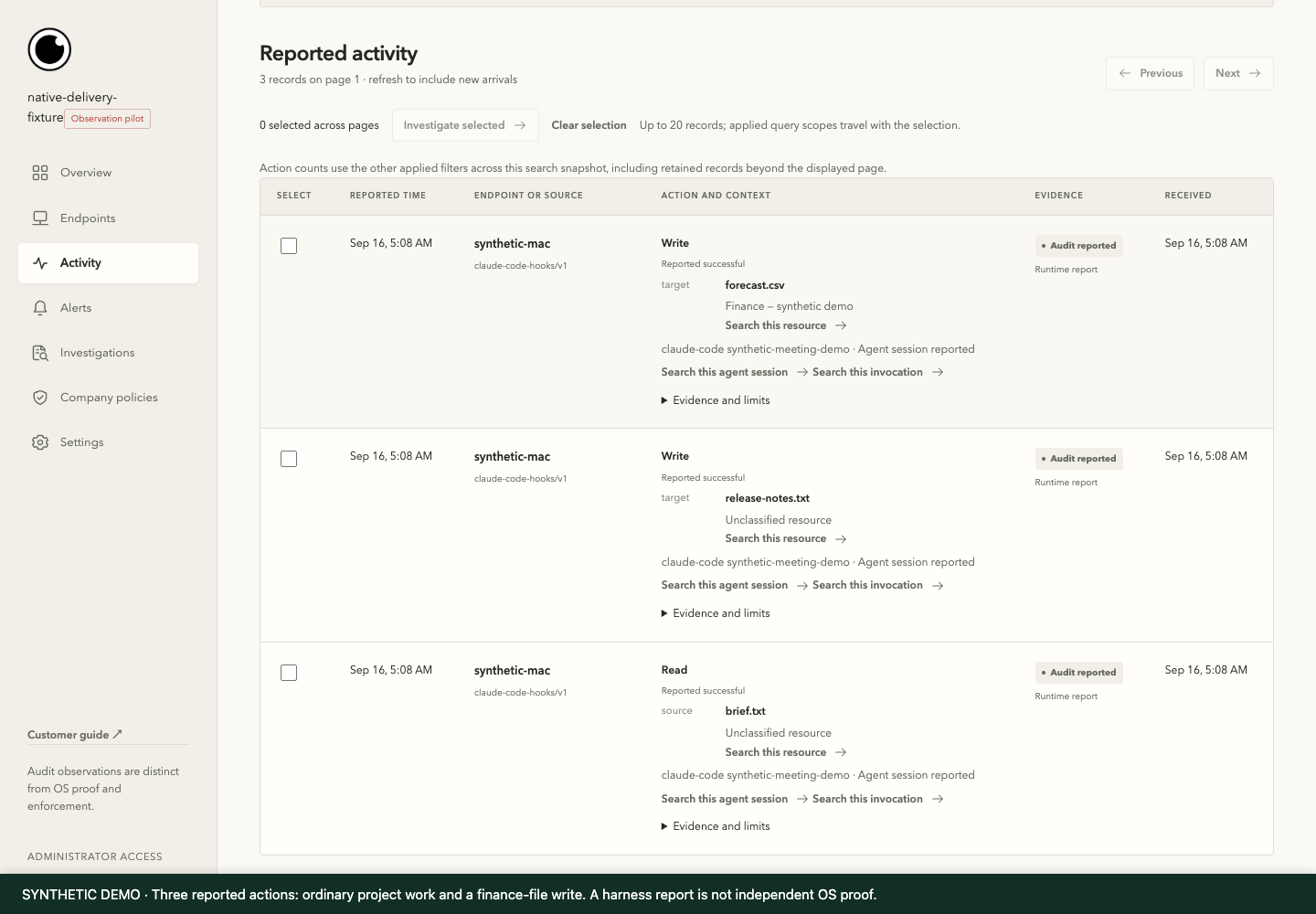
Gensee activity screen using synthetic demonstration data. Numbered annotations explain the important evidence. 1 2 3

01 / Activity

See the work around the exception.

  1. The reported action

    See what the harness reported, including its stated outcome.

  2. The affected resource

    A finance-file change sits alongside ordinary project work.

  3. The evidence basis

    Source labels distinguish runtime reports from independent OS observations.

View full-size screenshot
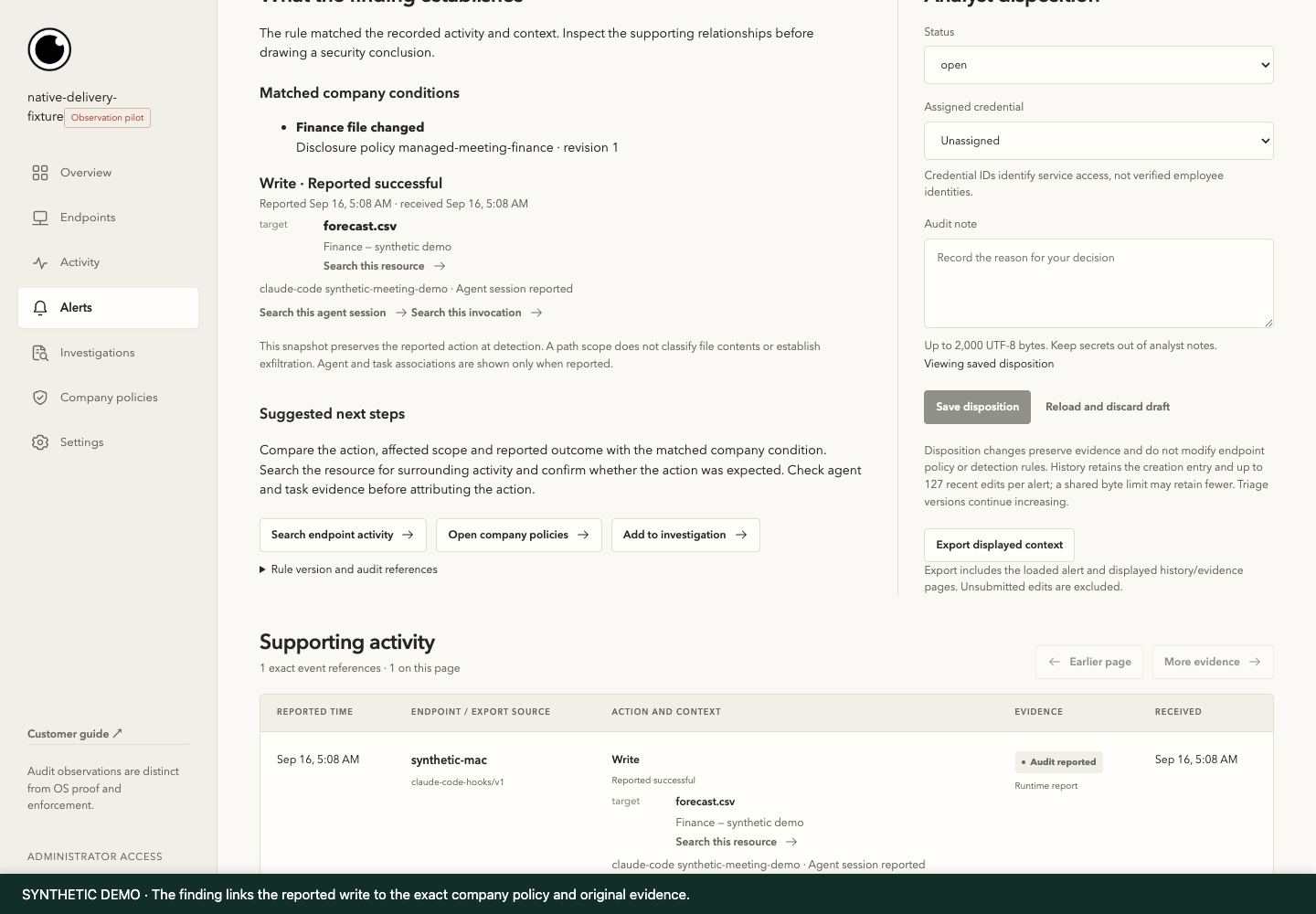
Gensee policy & alert screen using synthetic demonstration data. Numbered annotations explain the important evidence. 1 2 3

02 / Policy & alert

Understand why the action matters.

  1. The matched policy

    The finding names the company condition and policy revision.

  2. The action and target

    Inspect the reported write to forecast.csv and its source context.

  3. The next decision

    Carry the finding and its supporting evidence into an investigation.

View full-size screenshot
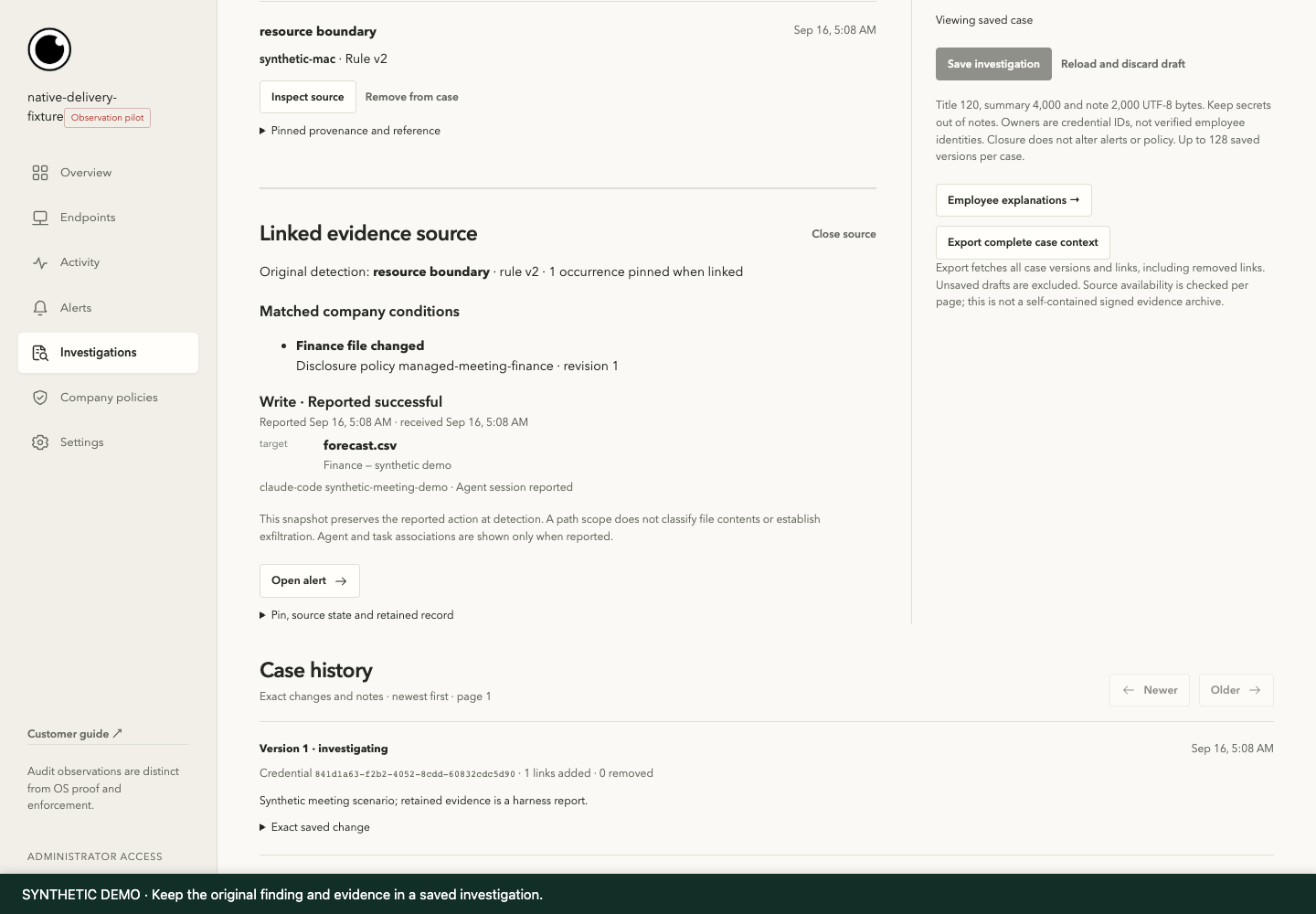
Gensee investigation screen using synthetic demonstration data. Numbered annotations explain the important evidence. 1 2 3

03 / Investigation

Keep the evidence connected.

  1. The original finding

    The saved case links back to the original detection.

  2. The supporting action

    Review the resource, reported outcome, and matched condition together.

  3. The case history

    Preserve a record of changes and assessments as the investigation develops.

View full-size screenshot
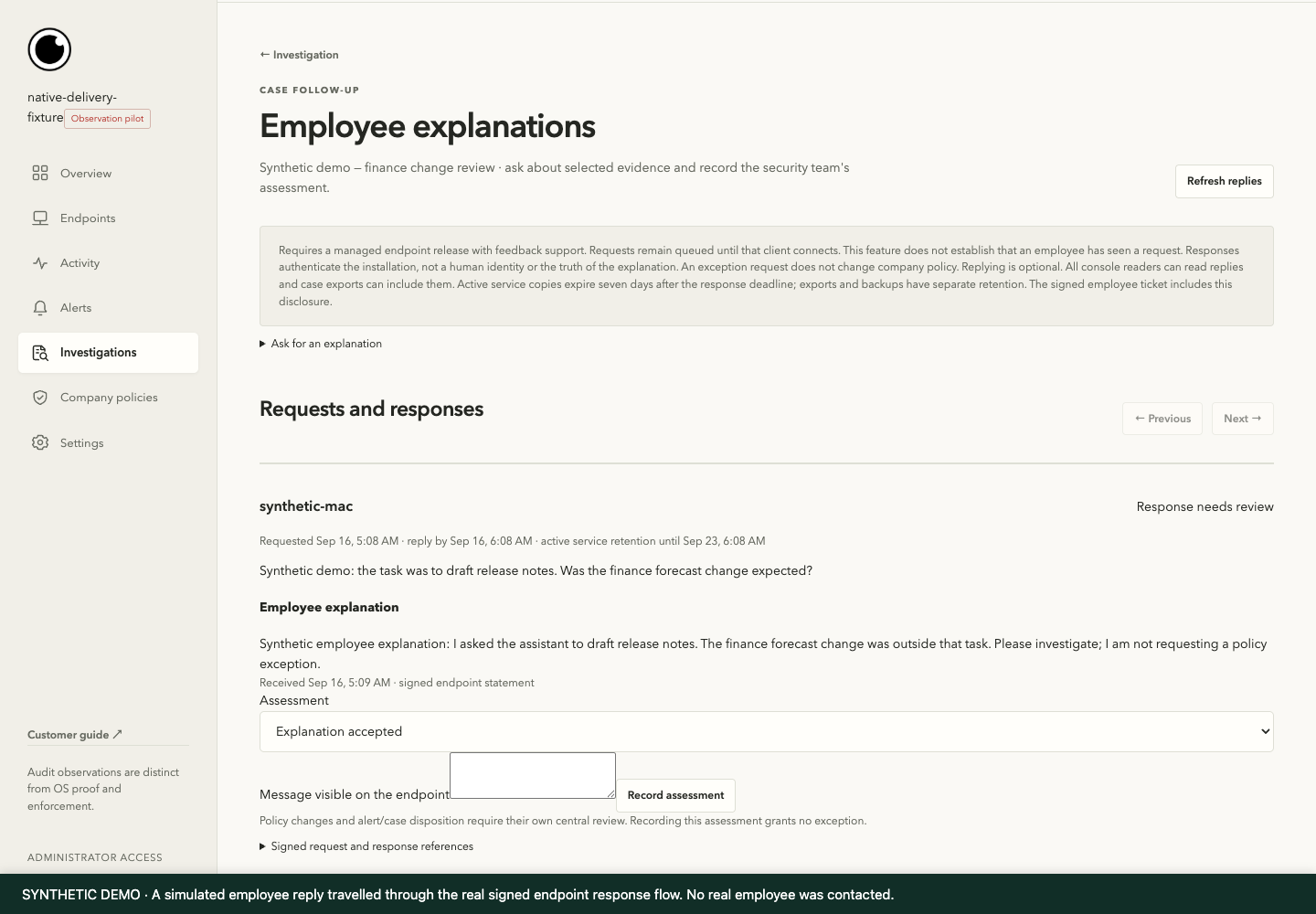
Gensee employee context screen using synthetic demonstration data. Numbered annotations explain the important evidence. 1 2 3

04 / Employee context

Give both sides a voice.

  1. A focused question

    Ask about the relevant action and task, with supporting context.

  2. The employee explanation

    Retain the response alongside the investigation evidence.

  3. The analyst assessment

    Document the decision. An explanation does not automatically change policy.

View full-size screenshot

Actual product · synthetic demonstration. The console and evidence workflow are real; source reports and the employee explanation are simulated. These screens demonstrate investigation, not preventive blocking.

Watch the captioned walkthrough

Silent walkthrough with on-screen captions. The annotated screens above provide a text alternative for the workflow.

A closer look

Know your boundaries.

Does every agent action need a human approval?

No. The design centers on reusable company policy: work inside an approved boundary can proceed automatically. Human review is reserved for actions and exceptions that require it. Policy decisions, alerts, and employee notifications are separate choices.

How does Gensee help reduce alert fatigue?

Related findings can share one alert while retaining their original evidence. Policy context and tiered screening help focus investigation. Reduced notification volume is distinct from a measured false-positive reduction; evaluation should track both missed issues and unnecessary interruptions.

What does a product demonstration establish?

The walkthrough shows the actual console, policy-linked findings, saved evidence, and employee-response workflow using synthetic inputs. A reported action, an observed effect, and verified preventive enforcement are different facts. Coverage depends on the source, integration, platform, and configured release.

Can rollback undo an external action?

Rollback and discard apply to supported isolated workspace state. They do not unsend an email, recall leaked data, or reverse arbitrary remote transactions. Publishing, network writes, and production changes need separately governed execution or approval.

Which environments can we evaluate?

Start with the exact workflows and platforms your team uses. The current demonstration covers the company console and managed Mac evidence workflows, including supported Claude Code and Cowork sources. Runtime isolation and enforcement depend on the execution environment. We will scope the integrations and acceptance criteria with you.

Let’s put it to work

More possibility.
Clearer boundaries.

See Gensee in action, or help shape what comes next. Start with the work your people and agents actually do.